100 checks


Use a bulk proxy checker to scan your proxies. Get quality scores, risk levels, location data, and protocol types in minutes.






One proxy checker app to validate, score, and export results at scale
Load 10 to 100,000+ proxies at once — TXT or CSV. No setup, just drag and drop
Queue does not crash on large batches. Runs in background so you can keep working.
Sort by quality, country, and type — export graded CSV or JSON with one click.
Perfect entry point to test proxies and weed out obviously bad variants
For those working with large volumes. Make each check nearly twice as cost-effective

Download the free desktop application for full power or add the browser extension for quick checks
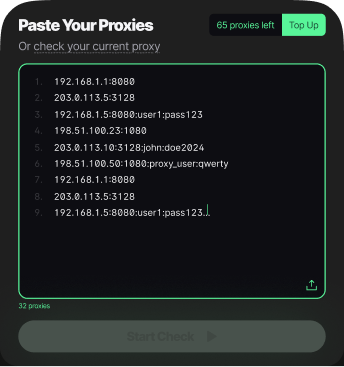
Paste a single proxy (IP:PORT) or upload a .txt file with your entire proxy list
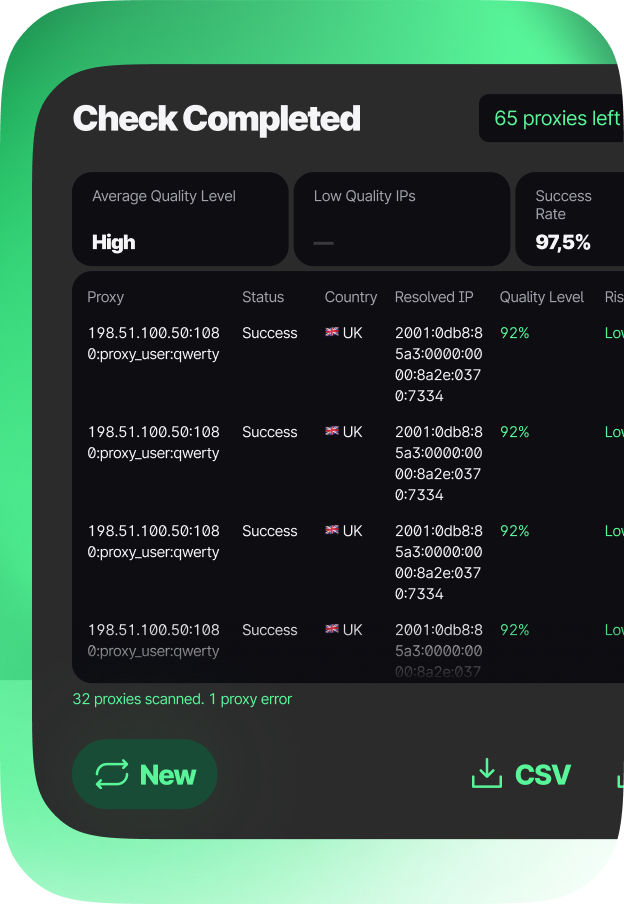
View the comprehensive table with scores, countries, risks, and statuses. Export clean data
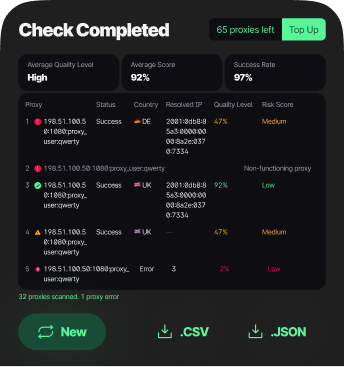
Pixelscan Bulk proxy checker validates your proxies in three simple steps: paste your list, run the scan, and review results. Our smart algorithm auto-detects any format including ip:port, tabs, spaces, or CSV, and even extracts proxies from webpage links. Each IP is tested for reliability, fraud risk, location accuracy, and connection stability using comprehensive real-time algorithms.
Free to try: New users receive 100 free proxy checks. Install from Microsoft Store, log in, and start validating today. Upgrade anytime for higher limits.
A bulk proxy checker validates multiple proxy servers simultaneously by testing connectivity, response time, anonymity level, and geographic location to identify working, high-quality IPs and filter out dead or risky ones. This saves significant time compared to manual testing and helps maintain clean, reliable proxy pools for automation tasks.
Pixelscan Bulk proxy checker uses comprehensive algorithms to evaluate reliability, fraud risk, connection stability, and geolocation accuracy for hundreds of proxies at once. Results include detailed metrics like latency, protocol support, and risk scores, then exports clean, verified lists ready for automation, scraping, or multi-account workflows.
Most bulk proxy checker online tools operate in your browser with limitations on file size, processing speed, and proxy list privacy since data is sent to remote servers for validation. Browser-based tools may also struggle with complex formats or large batches due to JavaScript timeouts and server-side throttling.
Pixelscan is available as a native desktop app for Windows and Mac plus a lightweight Chrome extension. Download from Microsoft Store, Apple App Store, or Chrome Web Store for flexible, secure validation that runs locally or in-browser based on your workflow needs.
Reliable bulk proxy checker download sources include official app stores like Microsoft Store, Apple App Store, or Chrome Web Store, ensuring you get malware-free, up-to-date software with proper support and regular security patches. Avoid third-party download portals that may bundle unwanted software.
Get the official Pixelscan bulk proxy checker download from Microsoft Store for Windows, Apple App Store for Mac, or Chrome Web Store for browser-based validation. All versions sync with your Pixelscan account for seamless access to free checks, upgrade options, and saved settings across devices.
Top-tier bulk proxy checker software combines intelligent format detection, real-time performance metrics, fraud risk scoring, geolocation verification, and flexible export options within an intuitive user interface that requires minimal learning curve.
Pixelscan bulk proxy checker software auto-detects any proxy format including ip:port, tabs, spaces, or CSV, flags high-risk or blacklisted IPs using multiple threat intelligence sources, verifies country and city matching for geo-targeted tasks, and supports SOCKS5, HTTP, and HTTPS protocols seamlessly with detailed logging across Windows, Mac, and Chrome platforms.
A robust bulk proxy checker tool should automatically parse and clean various input formats like ip:port, tab-separated values, space-delimited lists, or CSV files without requiring manual preprocessing or reformatting, reducing setup time and human error.
Pixelscan bulk proxy checker tool intelligently filters excess characters, recognizes delimiters automatically, preserves authentication credentials when present, and can even extract proxy entries directly from webpage links using smart pattern matching, so you simply paste your list and start scanning immediately on any supported platform.
Many free bulk socks5 proxy checker online services restrict protocol support, limit batch sizes, or throttle verification speed to encourage users to upgrade to paid plans, often with unclear pricing or hidden limitations.
Pixelscan offers 100 free proxy checks for new users with full support for SOCKS5, HTTP, and HTTPS proxies across Windows, Mac, and Chrome versions. All protocols receive the same comprehensive testing suite regardless of plan tier or platform choice.
Browser-based online bulk proxy checker tools often require uploading your proxy lists to external servers, creating potential privacy risks, slower processing due to shared resources, and strict file size caps that interrupt large workflows.
Pixelscan processes proxy lists locally on your device whether you use the Windows/Mac desktop app or Chrome extension, supports larger batches, runs multithreaded scans for faster results, and keeps your sensitive proxy data completely secure and private. Choose the platform that fits your workflow without compromising validation quality.
Free proxy validation services typically limit batches to 50-100 entries per session, while professional-grade tools allow unlimited bulk validation to support enterprise-scale automation and scraping operations with consistent performance.
Pixelscan free users receive 100 proxy checks per session to get started on any platform. Upgrade anytime to remove batch limits, unlock priority processing queues, and handle thousands of proxies efficiently for large-scale projects. Paid plans also enable saved profiles and scheduled re-checks for ongoing proxy pool maintenance.
Security-conscious proxy tools should process validation data locally on your machine and avoid transmitting sensitive proxy lists, credentials, or workflow details to third-party servers or cloud infrastructure that could be compromised.
Pixelscan runs as a native desktop app for Windows and Mac or a sandboxed Chrome extension, so your proxy lists stay entirely on your device. Only public webpage URLs are accessed if you optionally use the link extraction feature, and even then, no authentication data or private headers are transmitted. All results are stored locally unless you explicitly export them.
Begin by installing the application on your preferred platform, creating a free account, and preparing your proxy list in any common format such as ip:port, CSV, or space-separated values for immediate validation and testing. Having a clean, deduplicated list improves processing speed and result accuracy.
Review results with sortable columns, filter non-working entries, and export validated proxies in your preferred format for immediate use in your workflows.