AdvancedProxyChecker
Validate, score, and filter proxy lists with enterprise-grade accuracy. Detect location, anonymity level, and security risks in seconds
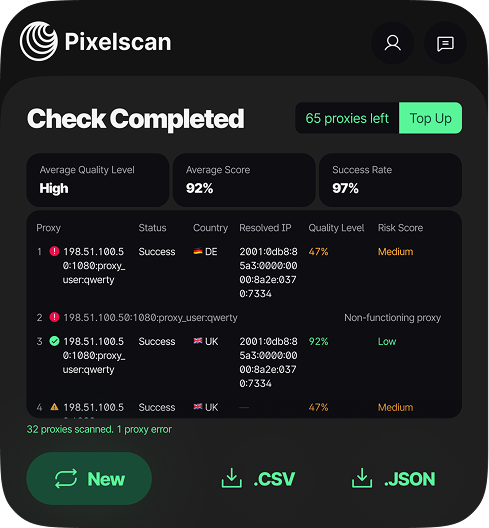
What Does the Proxy Checker Analyze?
Proxy Quality Scoring
Get a clear 0-100 score for speed, stability, and reliability. Filter out low-performance proxies
Precise Country Detection
Identify the true geographic location of your proxy server. Avoid geo-blocking issues
Risk & Security Assessment
Flag suspicious proxies, detect leaks, and evaluate anonymity level. Stay safe
Batch Testing & Integration
Upload lists, test hundreds at once. Seamlessly works with the Pixelscan companion app
How to Check Your Proxies in 3 Steps
Install the App or Extension
Download the free desktop application for full power or add the browser extension for quick checks
Input Proxy Data
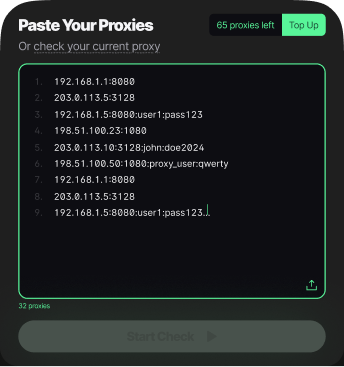
Paste a single proxy (IP:PORT) or upload a .txt file with your entire proxy list
Get Detailed Results
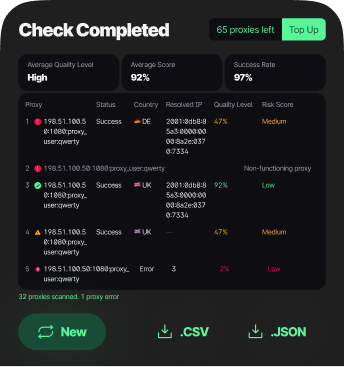
View the comprehensive table with scores, countries, risks, and statuses. Export clean data

Also Available
For Your Browser
Proxy Checker is a desktop app, but you can additionally use the browser extension with the desktop version
Why Choose Pixelscan Proxy Checker?
High-Accuracy Validation
Our algorithms minimize false positives and false negatives
Visual Quality Indicators
Green/Yellow/Red statuses and scores for instant comprehension
Risk Scoring System
Quantified risk assessment for informed decision-making
Batch Testing Support
Test massive lists without manual work. Save time
Cross-Platform Desktop App
Native application for Windows, macOS & Linux
Browser Extension
Quick-check any proxy directly from your browser bar
Frequently Asked Questions
Checking a proxy is more than seeing if it connects. You need to know if it is fast, reliable, and low-risk for multi-account setups or automation.
With Pixelscan Proxy Checker, paste a single proxy IP or a bulk list into the app. It instantly shows Fraud Score, Proxy Quality Rating, IP address, and location.
You can see which proxies are safe, which might get flagged, and which are too risky. This helps prevent account issues and saves time.
A proxy server can look functional but still have hidden risks. Pixelscan checks the server’s quality, reputation, and fraud signals.
You can see if the server is overused, flagged, or likely to trigger anti-bot systems. The app provides human-readable results showing which servers are safe and which to avoid.
This is essential for professionals using automation, scraping, or multi-account setups.
A working proxy is more than just a connection. It needs to be reachable, reliable, and safe for your setup.
Steps:
- Install the app or add the extension to your browser.
- Log in to your Pixelscan account.
- Add your proxy or paste a bulk list of IPs.
- View results, including Fraud Score, Proxy Quality, Connection Success, and IP Location.
Pixelscan helps you quickly identify which proxies are safe and ready to use, saving time and preventing issues in automation or multi-account workflows.
Sometimes a proxy is set up but not active. Pixelscan shows the IP your traffic is using, confirming whether the proxy is live.
It also provides location and risk data so you can verify your setup is secure and stealthy. This is especially useful for multi-account users who need consistent proxy use across browsers or applications.
Not all IPs are what they seem. Some are proxies, others are data centers, or risky shared addresses.
Pixelscan analyzes the IP using its continuously updated detection database. You get a Fraud Score, Proxy Quality Rating, and geographic location for every IP.
This helps you identify proxies, risky IPs, or VPNs, so only safe IPs are used in your automation or multi-account workflows.
Pixelscan supports any proxy provider, including residential, mobile, ISP, and datacenter proxies. You can add single IPs or bulk lists from any source, and Pixelscan will instantly analyze them for Fraud Score, Proxy Quality, Connection Success, and geographic location.
Popular proxy providers like NodeMaven, Bright Data, Oxylabs, and Smartproxy are fully supported, but you are not limited to these. This allows you to safely test proxies from all providers without worrying about compatibility, hidden risks, or reliability issues.
Yes. Pixelscan is built with security and privacy in mind. The app or extension does not collect, store, or expose your personal data or proxy connections. All checks are performed in real time, giving you detailed results without storing any sensitive information.
This makes Pixelscan a safe choice for professionals running multi-account setups, automation, or scraping workflows.
Pixelscan works on Windows and macOS, and supports Chrome and Firefox browsers. The standalone app and browser extension are regularly updated to stay compatible with the latest operating system and browser versions.
To stay informed about new devices, system support, or feature updates, follow our Telegram channel, where we announce updates as soon as they are released.
New users can try Pixelscan risk-free with 100 free proxy checks. This lets you test the app or extension, analyze single proxies or bulk lists, and see detailed results for Fraud Score, Proxy Quality, Connection Success, and IP Location without any cost.
Once you are ready to scale, you can upgrade to a subscription to boost your online proxy check limits and performance. This will give you the ability to validate hundreds or thousands of proxies.
The Technology Behind Reliable Proxy Checking
A robust proxy checker must go beyond simple ping tests. Pixelscan's engine performs sequential handshake attempts across multiple protocols (HTTP, HTTPS, SOCKS4/5) and analyzes response headers, timing patterns, and network behavior. This multi-layered approach is essential for identifying transparent, anonymous, and elite proxies, as well as detecting common failures and timeouts that skew marketing and data mining results.
Key to our accuracy is the continuous refinement of our detection algorithms against a vast, updated database of known proxy signatures and VPN endpoints. We assess not just "liveness," but also assign a quality score based on connection speed, stability over time, and risk score based on security headers and potential leak vectors. This dual-scoring system, visualised through clear green/yellow/red indicators, helps professionals quickly filter out unreliable or dangerous proxies from their workflows.