

Afina Browser: an antidetect browser for multi-accounting, automation and AI control
The other half of the product is automation. Alongside isolation you get a no-code scenario builder, scheduled Task Groups, a Synchronizer that mirrors actions across windows, and an MCP server that lets an AI agent drive the browser through plain text commands. One app covers both profile security and the routine around it.
That combination pays off wherever accounts are numerous and expensive: traffic arbitrage, crypto drop farming, social media, marketplaces, agencies running client ad accounts.
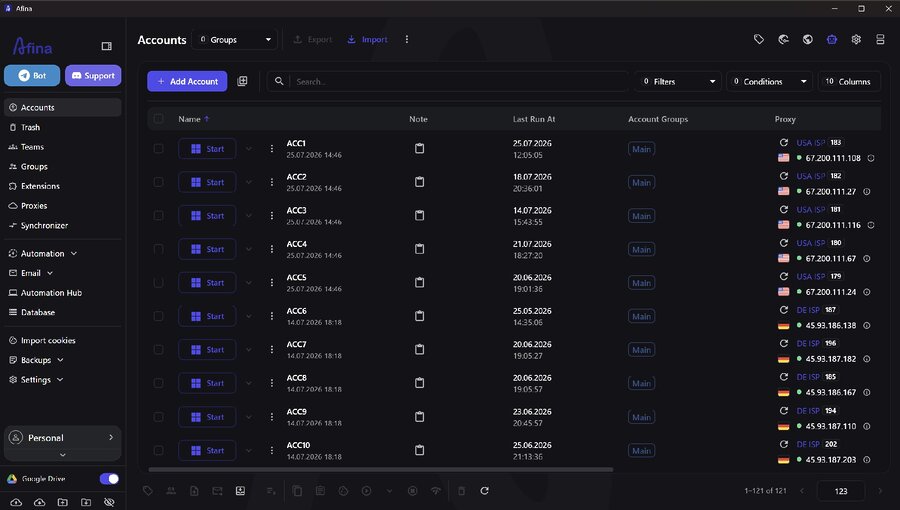
The Afina Browser main window: account list, groups and launch times
Work revolves around the account table. Profiles are grouped, tagged, and launched one at a time or in batches. Everything described below is configured per row in that table.
Profile isolation and the digital fingerprint
The usual reason several accounts on one machine end up linked is shared data at the system level: one cache folder, one cookie store, one browser process for everything. Afina removes that cause. Every profile runs as a separate process, and its HTTP, DNS, WebRTC and QUIC connections stay separate no matter how many windows are open. Cookies, cache, localStorage and IndexedDB are fully partitioned, so data bleed between sessions is technically impossible.
Data isolation closes half the task and the fingerprint closes the rest. One parameter that contradicts the others is the classic reason antifraud flags a profile even behind a clean proxy, so Afina spoofs fingerprints from real device configurations rather than random values. A profile assembled from random characteristics looks more suspicious than one that mirrors a real computer.
| Fingerprint parameter | Default behavior | What Afina does |
|---|---|---|
| 🎨 Canvas, WebGL, Rects, Audio | Rendering is unique to your hardware and identical in every account | Adds controlled noise separately for each profile |
| ⚙️ CPU, RAM, screen size | Every profile reports the specs of one computer, and window resizing adds a marker | Generates hardware values per profile, locks the window size |
| 🕒 Time zone and language | System time and language headers clash with the proxy country | Syncs both to the proxy geolocation via two checkboxes |
| 🧩 User-Agent and browser core | Identical across profiles, changed by hand only | Edits them individually or in bulk for a whole group |
Every parameter sits in one window during profile creation. The regenerate button refreshes the hardware profile along with CPU core count and RAM, and the result shows up on the info panel right away.
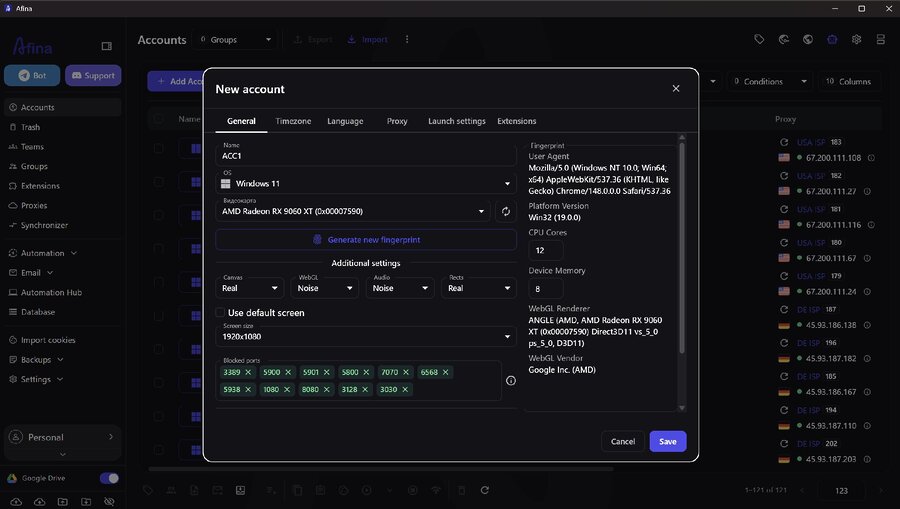
Profile creation in Afina: Canvas, WebGL and Audio spoofing plus hardware values
For existing profiles, User-Agent, browser core and noise settings change in bulk through the group actions menu rather than record by record.
Proxies, WebRTC and the network stack
The proxy is usually the weak link in multi-accounting: when it contradicts the rest of the profile, every other layer of isolation stops mattering. Afina supports HTTP, HTTPS and SOCKS5, and each profile gets its own.
The detail that matters here is UDP support. When a SOCKS5 proxy genuinely passes UDP traffic, WebRTC, QUIC/HTTP3 and WebTransport start working automatically. When it does not, antifraud catches the mismatch: a WebRTC public IP that disagrees with the remote IP, or the real DNS resolver showing through. Residential providers often claim UDP support on paper and fail to carry QUIC in practice, so test the provider yourself.
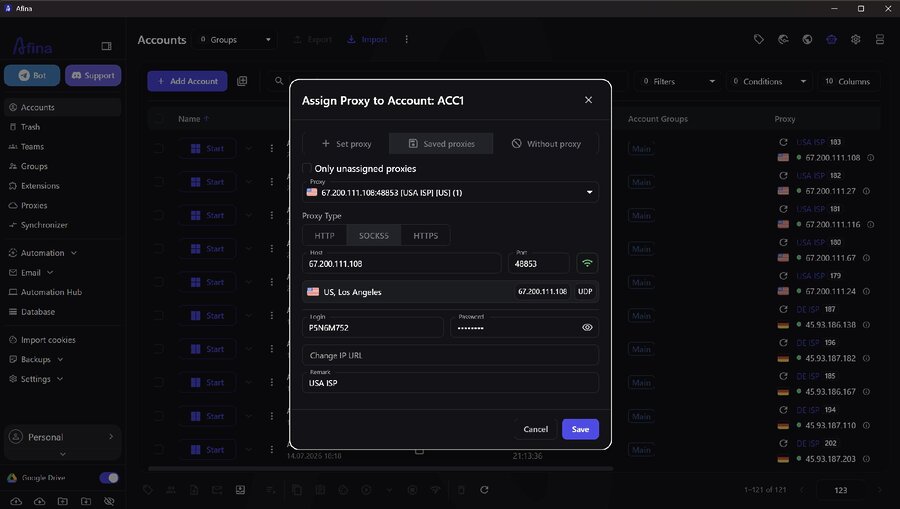
Adding a proxy: SOCKS5, host and port, geolocation and the UDP flag
WebRTC itself is one of the least obvious leaks: the address bar can show a clean proxy IP while the browser quietly hands the real device address to the page. In Afina it works automatically, and for scenarios that never need it there is a full shutoff in the main settings, RTCPeerConnection off.
None of this has to be checked by hand: the built-in test reports the real IP, country and node availability before launch, and the bulk version runs the whole list at once, UDP included. One more rule, changing IP mid-session is an instant red flag, so a sticky session beats rotation.
Afina and PixelScan: verifying a profile before launch
Isolation only counts when the result is visible from the outside. Afina controls how the profile reaches the network: fingerprint, proxy, time zone, language, WebRTC and DNS behavior. A checker like PixelScan shows what a site actually sees when the profile connects, and whether any parameters disagree.
The working loop: build the profile in Afina, attach the proxy, open the checker in that same profile, compare IP, WebRTC, time zone and language, then fix any mismatch before you log into the account.
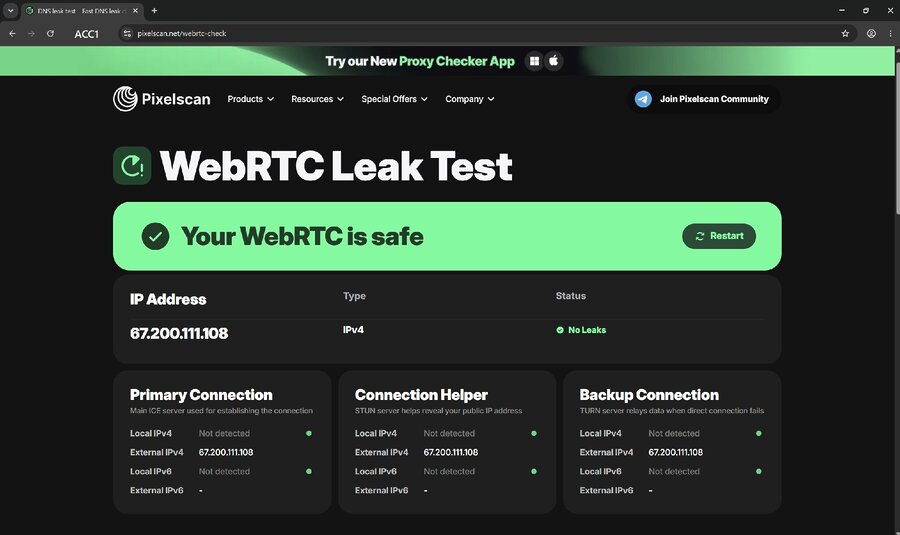
PixelScan check: no WebRTC leak, external IP matches the proxy
The check takes a minute and saves hours of untangling a ban. It fits best into the warming routine for new profiles: checker first, first login second.
No-code automation and profile sync
Automation scenarios are built on an interactive canvas with no code involved. You drag the blocks you need from the panel on the left: navigation, clicks, waits, checks, branching. Finished scripts run in normal, background or step-by-step mode, so the logic is visible before it touches live accounts.
Writing every scenario from scratch is optional. The Automation Hub ships ready-made scripts and modules with search and tag filters: account warming, data scraping, e-commerce, traffic arbitrage, profile prep for crypto drops. Basic warming has its own tool, Cookie Robot: give it a list of URLs and it generates the cookies.
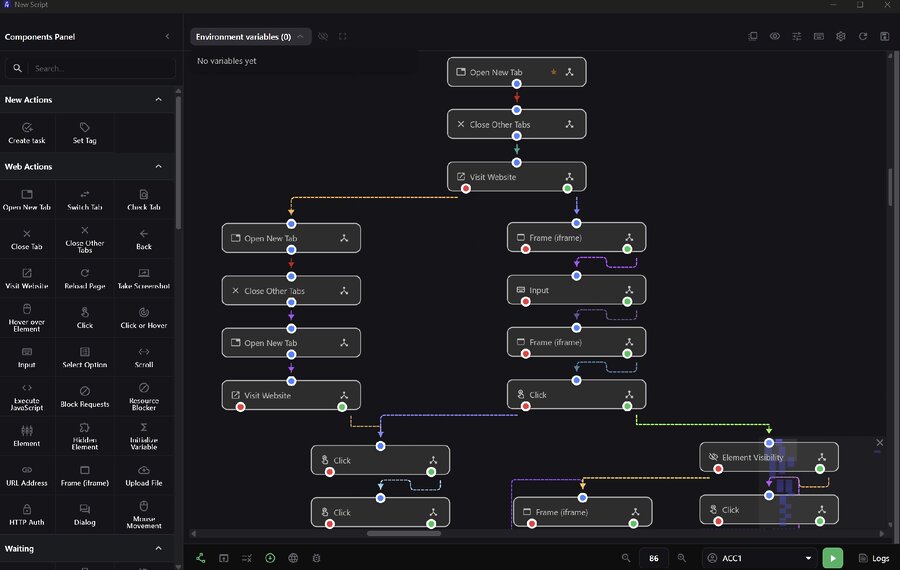
The visual script builder: components panel and a canvas of action blocks
Bulk execution belongs to Task Groups: a limit on parallel sessions, retry count for failed tasks, randomized account order in the queue, and the schedule itself, from instant start to fixed time windows.
Where a script would be overkill, the Synchronizer takes over. Every action in the main window, typed text, clicks and navigation, repeats in the other open profiles. Windows lay out in a grid, tabs align, new URLs open everywhere at once.
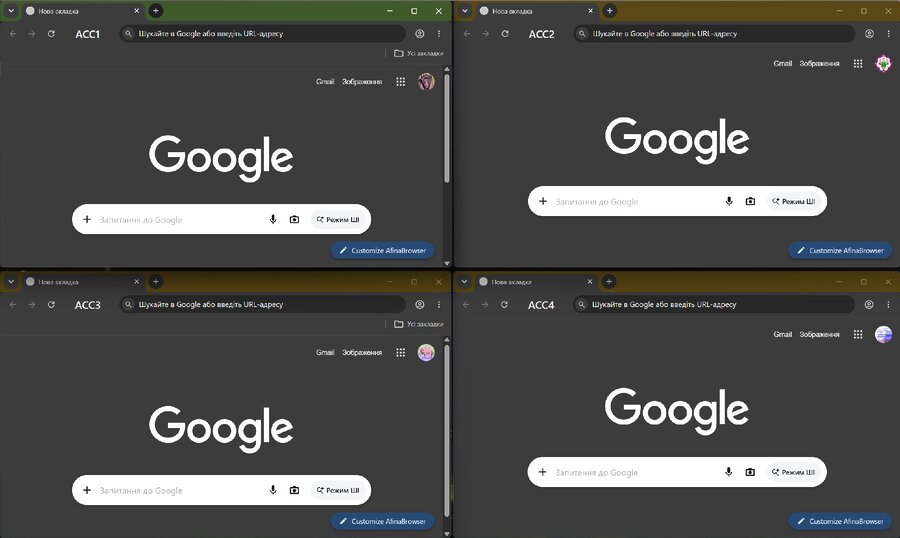
The Synchronizer panel with two mirrored browsers in Grid mode
Repetitive work wins the most: farming and multi-accounting, crypto airdrops, mass registrations, any case where the same site has to be open in twenty windows.
MCP server: browser control through an AI agent
Every new site usually means a new script, which means more developer hours. The Afina MCP server removes that step.
It is a local bridge between the browser and a model such as Claude, Cursor or ChatGPT. You write the command in chat, and the agent breaks it into steps, calls the tools it needs, works around errors and hands back a finished result.
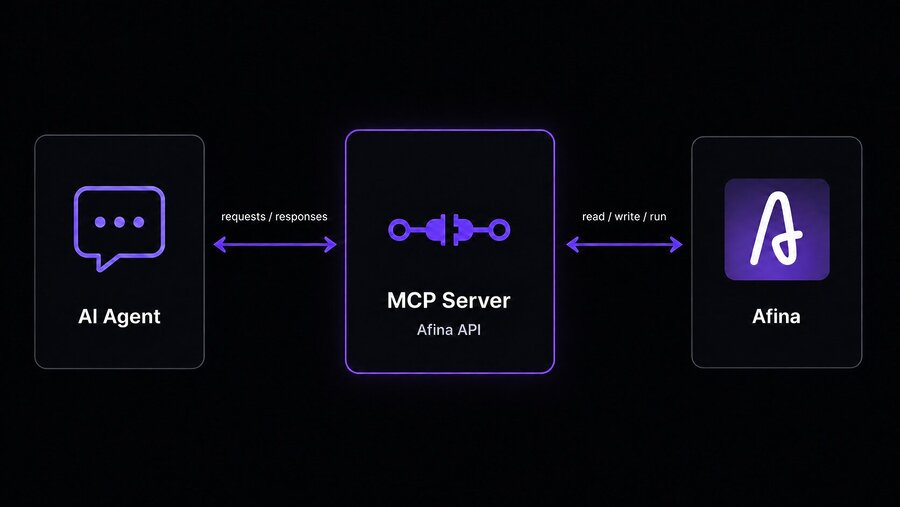
MCP diagram: Claude exchanges requests with the local Afina MCP server
The agent has 99 tools through MCP, covering nearly everything you do by hand, from creating an account and attaching a proxy to reading logs after a crash.
| Tool group | What the agent does | Sample request |
|---|---|---|
| 👤 Accounts and profiles | Creates permanent or one-time profiles with unique fingerprints, launches and closes them | “Create 50 profiles on US proxies” |
| 🖱️ Browser session | Finds buttons and fields by text, reads pages, takes screenshots, runs JavaScript | “Open the login page and screenshot it” |
| 🤖 Scripts and modules | Builds RPA scenarios from blocks, runs them, reads logs, writes custom JS modules | “Why does the script crash on 12 accounts?” |
| 📅 Task Groups | Creates schedules, spreads launches across profiles, tracks active tasks | “Schedule warming daily from 9 to 18” |
| 🔐 Proxies, data and variables | Adds and bulk-checks proxies, works with databases and encrypted variables | “Store the seed phrase encrypted” |
Any agent with MCP support will do. And “launch a profile by command” is the smallest thing this pairing can do. When a script breaks across dozens of accounts, the agent reads the logs, finds the common cause, patches the script and restarts the job. On an unfamiliar site, a screenshot in the chat is enough for it to find the elements.
Data security
By default your data stays on your device rather than on someone else’s server. Passwords and seed phrases go through AES-256-CBC, and the key file itself sits behind a master password. Profiles, cache and logs live locally, backups follow rules you set, and Google Drive sync is opt-in and always encrypted. Lose the key file or the master password, though, and encrypted data cannot be recovered, so keep a copy of the key on separate media.
Who Afina Browser is for
Afina earns its place where profiles are many and half the work on them repeats. The isolation holds up equally well on crypto exchanges, social platforms, ad accounts and marketplaces.
| Who | Task | What Afina covers |
|---|---|---|
| 💰 Media buyers | Hundreds of ad accounts, constant bans and restarts | 200 profiles with unique fingerprints and proxies in seconds, through the API or an AI agent |
| 🪙 Crypto and airdrop hunters | Farming drops, getting past Sybil detection | Isolated profiles, activity spread over time, seed phrases in encrypted variables |
| 📱 SMM specialists | Dozens of social profiles, the same actions daily | Synchronizer, no-code scripts and plain text commands, no CSS selectors |
| 🛒 Marketplace sellers | Several stores, price and assortment monitoring | Separate sessions and cookies per account, scraping and warming on a schedule |
| 🏢 Agencies and teams | Client accounts, several operators in one workspace | Groups, tags, team access and one profile database instead of scattered devices |
Media buyers create profiles in batches instead of clicking through the interface, crypto users get separated activity and encrypted storage, SMM teams and sellers hand the routine to the Synchronizer or the agent.
FAQ
Technically you can run without one, but a realistic network profile means each account has its own proxy, matched to its geolocation, time zone and interface language. Without that alignment antifraud spots the mismatch fast.
No. Afina provides the tools for isolation, fingerprint control and network management, but the outcome depends on proxy quality, behavior inside the account and platform policy.
No. Commands are written in plain language in chat, and the agent splits the task into technical steps and calls the MCP tools itself.
There is no software limit. The ceiling depends on your RAM and CPU, plus the maximum browser count set in the main settings.
Conclusion
Nobody buys an antidetect browser for the interface. The question is always the same: will the profile hold up once a platform takes a close look at it. In Afina every account lives in its own process and its own folder with a separate network stack, so cookies, cache and DNS from two profiles never touch, even with both windows open side by side.
The fingerprint comes from real configurations rather than random numbers: Canvas, WebGL, audio, cores, memory and screen size hang together, while time zone and language follow the proxy IP by themselves. That is easiest to judge from the outside. Open PixelScan in a freshly built profile and you see one external IP across every connection, a silent WebRTC and no contradictions. A minute of work, after which you can log in without holding your breath.
The second reason people stay on Afina has nothing to do with security. It is automation. Warming, registrations, data collection, the same clicks in twenty windows, all of it goes into the no-code builder or onto a schedule as a Task Group. For an unfamiliar site you may not write a script at all, just dictate the task to an agent through MCP. An evening of manual work compresses into one message in a chat.
Build one profile, run it through the checker and judge the result yourself. Download Afina Browser and see it on your own accounts.