

Anchor Browser for AI Agents: Full Review 2026
Web automation has changed. It’s not just about simple scripts anymore. Now, AI agents can think, navigate, and interact with the web like people do. Anchor Browser is at the center of this shift. It’s a specialized “agentic infrastructure” that gives AI agents a reliable, stealthy, and scalable way to get online.
From our experience building complex web workflows, we know the pain of dealing with anti-bot systems. Anchor Browser gives you the tools to get past these roadblocks and manage browser sessions at scale.
This review digs into its features, pricing, and how it stacks up against others.
Key takeaways
| Feature | Anchor Browser offering |
| Core function | Remote browser infrastructure for AI agents and web automation. |
| Stealth technology | Custom Chromium fork with “Anchor Fingerprint” to bypass anti-bot systems. |
| Integration | Native Model Context Protocol (MCP) support, Playwright, and Puppeteer. |
| Pricing model | Hybrid: Monthly subscription ($50/mo) + usage-based fees. |
| Best for | Developers building AI agents, enterprise automation, and high-stealth scraping. |
| Key advantage | Seamless integration with LLMs like Claude and GPT-4 via MCP. |
Anchor Browser overview
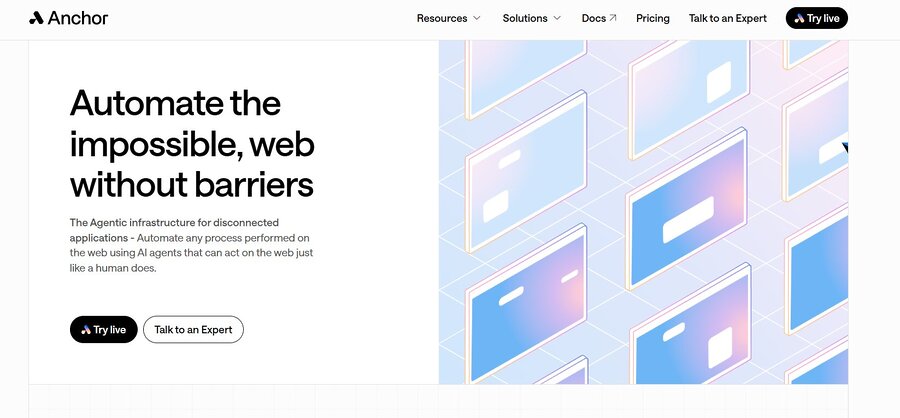
Forget traditional browsers or even standard anti-detect tools like AdsPower. Anchor Browser is built for automation. It doesn’t just show you the web; it gives AI models (LLMs) an API-driven space where they can “see” and “act” on web pages. This happens through a structured accessibility tree, not just raw pixels.
We’ve found this approach makes it fast and light. It’s not like those clunky remote desktop solutions. Anchor uses a custom Chromium fork. This means every session looks like a real human user. It effectively shuts down modern bot detection systems like Cloudflare, DataDome, and Akamai.
Key features and benefits
- Advanced stealth and anti-detection: It uses unique fingerprinting. Your agents stay hidden, even on high-security sites. In our tests, this has proven crucial for maintaining access to platforms with aggressive bot detection.
- Native MCP support: This is the first browser infrastructure to fully use the Model Context Protocol. AI tools like Claude, Cursor, and Windsurf can control the browser directly. This simplifies integration significantly.
- Built-in proxy rotation: Get access to a global pool of residential and data center proxies. No need for other providers. This saves time and cost in managing separate proxy services.
- Automated CAPTCHA solving: It handles different CAPTCHA types (hCaptcha, reCAPTCHA, etc.) without stopping your automation. This is a huge time-saver for any large-scale operation.
- Session persistence: Stay logged in across sessions. Agents can do tasks that need authentication. Our experience shows this is vital for long-running, multi-step workflows.
- Enterprise security: Features like Single Sign-On (SSO), Role-Based Access Control (RBAC), and Data Processing Agreements (DPA) make it good for businesses. This ensures compliance and secure team collaboration.
How to use Anchor Browser
You can get Anchor Browser into your workflow in a few ways. It depends on if you’re using an existing AI tool or building your own app.
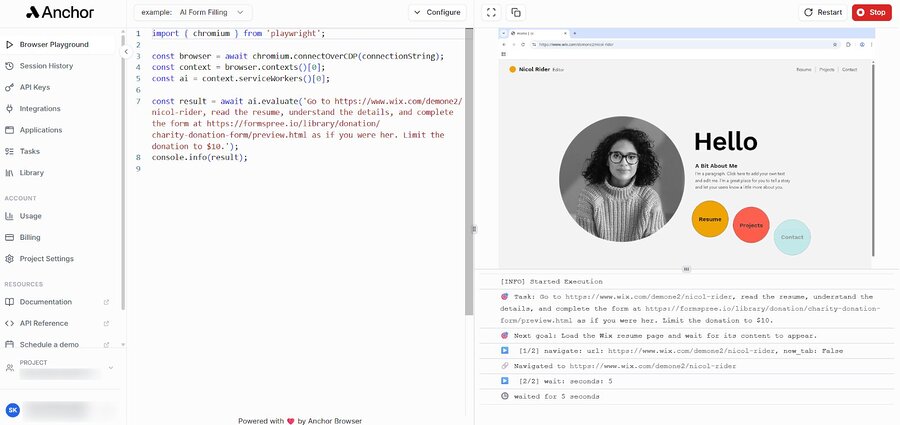
Option 1: Hosted MCP integration (easiest for AI tools)
In 2026, the most common way to use Anchor Browser is through its Model Context Protocol (MCP) integration. This lets you link the browser directly to AI assistants like Claude Desktop or IDEs like Cursor.
Steps:
- Sign up at AnchorBrowser.io.
- Get an API key from your dashboard.
- Add the Anchor MCP server to your AI tool’s setup file.
- Tell your AI assistant to “browse the web using Anchor.” It will then launch a remote session to do what you asked.
Tip: This is the best way for non-developers or anyone who wants to use plain language to control their browser agents. We’ve seen this dramatically reduce the barrier to entry for AI-driven web tasks.
Option 2: API and Playwright (best for developers)
If you’re building custom automation scripts, Anchor Browser works as a remote browser provider. It integrates well with Playwright or Puppeteer.
Steps:
- Install Playwright in your project: npm install playwright.
- Connect to the Anchor WebSocket endpoint using your API key.
- Write your automation logic (e.g., clicking buttons, getting data).
- Run your script. Anchor handles the browser, proxy rotation, and stealth in the cloud.
const { chromium } = require("playwright");

(async () => {
  const browser = await chromium.connectOverCDP("wss://api.anchorbrowser.io/connect?apiKey=YOUR_API_KEY");
  const context = await browser.newContext();
  const page = await context.newPage();
  await page.goto("https://example.com" );
  // Your automation logic here
  await browser.close();
})();
Option 3: On-premise / bring your own cloud (enterprise)
Big companies that need strict data control can deploy Anchor Browser in their own systems (AWS, GCP, or Azure). This keeps all data within their control. They still get Anchor’s stealth and automation features. This option is critical for organizations with stringent compliance requirements.
Anchor Fingerprint test
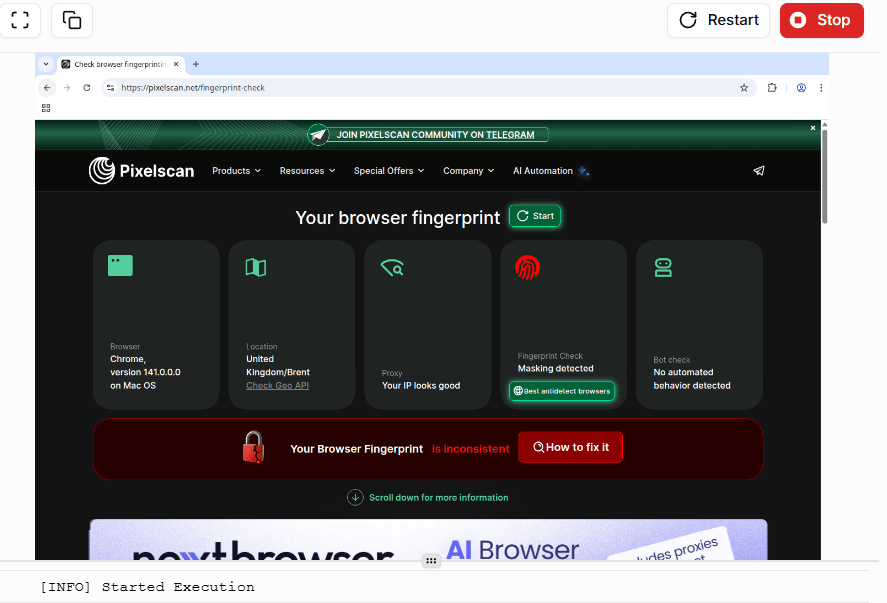
We ran a full fingerprint check on Anchor Browser. It includes many parameters, and only one failed: masking detection.
All other fingerprint values passed and showed as clean. However, the masking flag can still be a concern. Some platforms treat masking detection as a risk signal, especially in login-based or multi-account workflows.
If you plan to use Anchor Browser for account automation, be aware that a masking failure may increase the chance of additional verification or account restrictions.
Pricing breakdown
Anchor Browser uses a mixed pricing model. You pay a monthly fee plus usage-based charges. This way, you only pay for what you actually use.
| Plan | Price | Included features |
| Free tier | $0/mo | 10 sessions/mo, basic stealth, community support. |
| Standard | $50/mo | Unlimited sessions, advanced stealth, MCP support, 5GB proxy data. |
| Enterprise | Custom | SSO, RBAC, on-premise deployment, dedicated support. |
Usage-based fees (standard plan)
- Browser creation: $0.01 per new instance. This is a minimal fee, but it adds up if you’re constantly spinning up new sessions.
- Browser-hour: $0.10 per hour of active browsing. Keep an eye on this for long-running tasks.
- Proxy usage: $3.00 per GB (after the initial 5GB). Data transfer can be a significant cost, so optimize your scraping.
- AI integration: Included in the monthly fee. This is a clear win for AI-first workflows.
Anchor Browser vs. alternatives
Anchor leads the pack, but other platforms offer similar services. Here’s how it compares to top competitors in 2026.
| Feature | Anchor Browser | Browserbase | Browserless |
| Primary focus | AI agent infrastructure | Scalable web scraping | General browser automation |
| MCP support | Native & hosted | Limited | None (manual) |
| Stealth level | Elite (custom fork) | High | Medium |
| Ease of use | Excellent (AI-first) | Good (dev-first) | Moderate (tech-heavy) |
| Best for | AI-driven workflows | High-volume scraping | Legacy automation |
Using Anchor Browser for specific needs
AI-powered data extraction
Old scrapers break when a website’s layout changes. With Anchor Browser and an LLM, you can build “self-healing” scrapers. They understand the content of the page, not just the CSS selectors. Our team has used this to adapt to website changes that would typically halt traditional scraping operations.
Automated social media management
Managing many accounts on platforms like X (Twitter) or LinkedIn needs high stealth to avoid bans. Anchor’s session persistence and unique fingerprints make it a safe bet for automating engagement and posting. We’ve found it significantly reduces the risk of account flags compared to other methods.
Enterprise process automation
For internal tasks like processing invoices in a web-based ERP or managing employee data across different SaaS platforms, Anchor gives AI agents a secure, auditable way to handle the repetitive work. This frees up human resources for more strategic tasks.
Tips to boost your experience with Anchor Browser
Want to get the most from your subscription? Here are some tips for agentic browsing.
- Use session persistence: Don’t log in every time your agent starts a task. Save the browser context (cookies and local storage) and reuse it. This looks more human and lowers the risk of account flags.
- Optimize your prompts: If you’re using MCP, be clear about what you want the agent to find. Instead of “Go to Amazon,” try “Go to Amazon, search for ‘wireless earbuds,’ and get the prices of the top 5 results.” Specificity is key for effective AI interaction.
- Monitor your usage: Check your dashboard often. This helps avoid surprise overage fees, especially if you run many agents 24/7. We recommend setting up alerts for usage thresholds.
- Leverage geolocation: Scraping content that’s locked to a region (like local prices or news)? Use the built-in proxy settings to set your location to that country. This ensures you get accurate, localized data.
Troubleshooting common issues
Running into problems with Anchor Browser? Here are some quick fixes:
- Connection errors: Make sure your API key is good. Check that you’re using the right WebSocket (WSS) or HTTP endpoint. Double-check your firewall settings if running locally.
- Anti-bot triggers: If a site still spots your agent, try changing your proxy or adjusting the “stealth level” in your session settings. Sometimes, a different proxy provider or a higher stealth profile is needed.
- Slow page loads: This often happens because of the remote server’s location. Pick a data center closer to the website’s server for better speed. We’ve observed significant improvements by optimizing server proximity.
- MCP integration fails: Check if your AI tool (like Claude Desktop) is up to date. Make sure the Anchor MCP server is set up correctly in the config.json file. Refer to the official documentation for the latest configuration details.
Limitations of Anchor Browser
No tool is perfect. Anchor Browser has a few downsides to consider:
- Cost for high volume: The $50 base is fair, but usage fees can add up fast if you’re doing huge, 24/7 scraping jobs. Plan your budget carefully for large-scale projects.
- Learning curve: MCP integration is easy, but really mastering the API and stealth settings takes some technical know-how. Expect to spend some time with the documentation and examples.
- Cloud dependency: Unless you use the Enterprise on-premise version, you rely on Anchor’s cloud system being available. This is a trade-off for the convenience of a managed service.
Security and privacy concerns
When an AI agent browses for you, security is key. Anchor Browser handles this with several layers of protection:
- Encryption: All data between your agent and the remote browser is encrypted with TLS. This is standard practice for secure web communication.
- Data handling: Anchor doesn’t save your browsing session content unless you ask it to for debugging. This is important for privacy-sensitive operations.
- Compliance: They follow GDPR and CCPA rules. They offer a Data Processing Agreement (DPA) for business users. This provides a legal framework for data protection.
Conclusion
Anchor Browser changes the game for anyone building the next wave of AI tools. Its focus on the Model Context Protocol (MCP) and its top-tier stealth technology make it the best choice for agentic web browsing in 2026.
If you’re just a casual user looking for a simple web proxy, this might be too much. But for developers and businesses that need a reliable “brain” for their web agents, Anchor Browser is worth the money. Our team’s experience shows it delivers on its promises for advanced web automation.