

Aurorium antidetect browser review: features, fingerprinting, and pricing
Aurorium is an anti-detect browser built around three things: AI-assisted fingerprint generation, a full team-management layer inside the client, and network handling that goes a bit deeper than the usual toggle settings. Here’s what stood out after testing it.
An in-depth review of Aurorium, an antidetect browser with AI-generated fingerprints, a built-in CRM, and mobile app. Features & pricing inside.
What using Aurorium feels like on first login
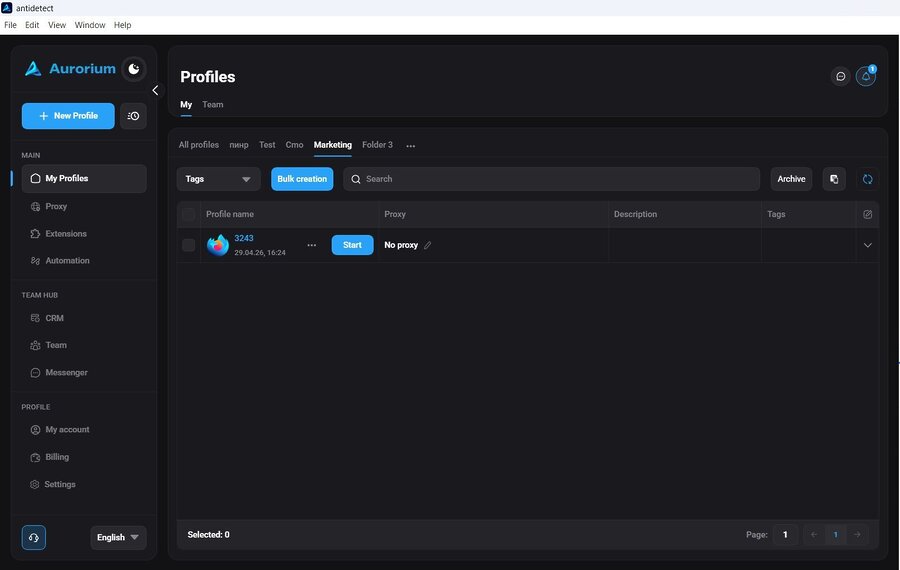
The interface is laid out simply. Profiles, proxies, extensions, and a team hub sit where you’d expect them to, without digging through nested menus for basic settings.
The dark theme, paired with a soft blue accent color, is easy on the eyes during long sessions.
How solid is Aurorium’s browser fingerprinting
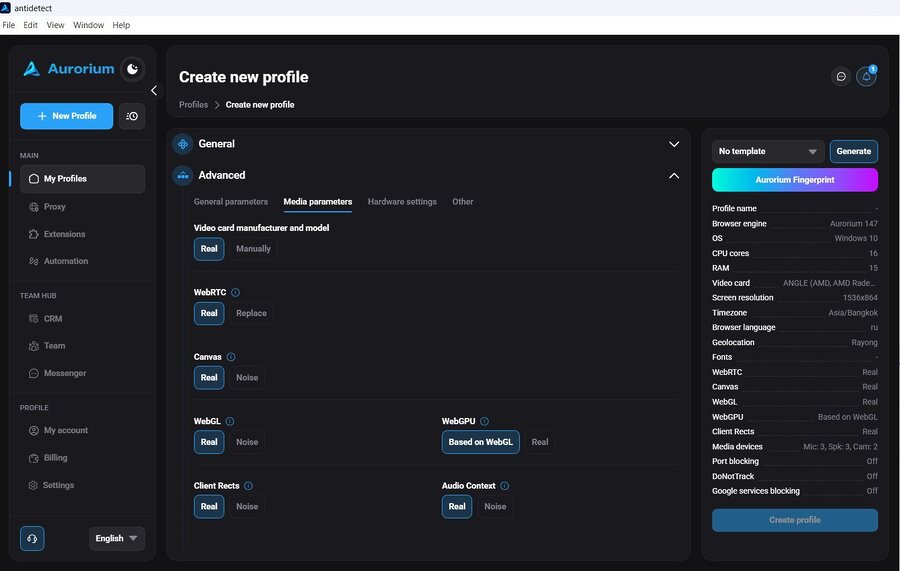
Every anti-detect browser lives or dies by its fingerprinting, so this is worth checking closely.
- Spoofing method: Aurorium spoofs fingerprints at a low level instead of using JavaScript injection. Profiles tested against standard fingerprint checkers like CreepJS and BrowserLeaks didn’t show the kind of red flags that usually give away a spoofed session.
- Canvas: This is a common weak point. A lot of tools apply crude noise that’s easy to spot. Aurorium’s Canvas output looked clean under CreepJS, likely because font rendering is handled at the engine level rather than through simple noise.
- WebGL: WebGL is the part of the browser that handles graphics rendering, and it’s another common giveaway for spoofed profiles. Aurorium came back with a “moderate” trust score here, correctly showing the graphics card details without conflicting with the rest of the emulated hardware. For comparison, that’s roughly the same score a normal, unmasked Chrome browser gets. A tool claiming a “high” score on a virtual profile is more of a red flag than a selling point, since real hardware doesn’t score that way either.
Aurorium’s AI-generated fingerprints
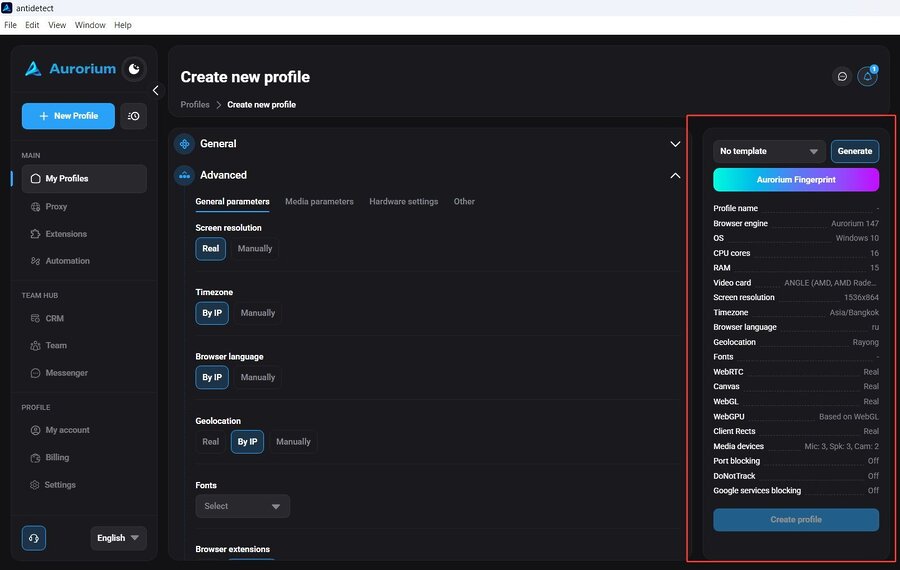
This is Aurorium’s main differentiator. Instead of building a fingerprint from a fixed list of preset values (the standard approach most competitors use), Aurorium uses AI to generate fingerprints where all the parts match up: the CPU, GPU, screen, and audio settings read as one plausible real device instead of a random mix of parts.
There’s also a practical benefit to this approach:
- Anti-detect browsers pull fingerprints from a limited pool of hardware combinations, so two unrelated profiles can end up with the same fingerprint by chance.
- If one profile’s fingerprint gets flagged, a new profile built on that same combination can run into the same problem right away.
- Aurorium’s AI generation avoids repeating a fingerprint that’s already been used within an account, so a new profile isn’t accidentally built on the same footprint as one that already had issues.
How Aurorium handles networking, proxies, and IP leaks
For teams running many profiles, IP leaks are one of the more costly mistakes since a single leak can link separate profiles together.
- WebRTC: This is the browser feature that handles audio/video calls, and it’s a common leak source because it often bypasses proxy settings and exposes the real local IP address. Aurorium routes this traffic through its own network stack, so the proxy IP shows up correctly without needing to disable WebRTC entirely (a disabled WebRTC setting is itself often read as a sign of an automated session).
- DNS: DNS requests are resolved through the proxy instead of the local internet connection, closing another common leak path.
- Local network scanning: Some sites scan the local network for open ports as a way to check whether a session is running from a virtual machine or server instead of a real device. Aurorium includes a toggle to block this, available directly in profile settings.
Profile creation and manual hardware customization options
Profile setup covers the standard operating systems (Windows, Mac, Linux) with version selection, and sets time zone, browser language, and location to match the proxy’s IP by default. That default matters: a mismatch between the proxy’s location and the browser’s language or time zone is one of the most common causes of account flags.
For more manual control, there’s:
- Hardware settings: set CPU core count, RAM, and graphics card model directly
- Fingerprint noise controls: for Canvas, WebGL, WebGPU, and audio settings
- Device emulation: set the number of virtual webcams and microphones on a profile, so the reported hardware looks like a typical consumer device
Managing cookies, sessions, and advanced browser settings
Cookies can be imported in JSON or Netscape format by drag-and-drop or plain text paste, and sessions can be set to restore open tabs automatically after a restart.
For technical users, there’s also:
- A field for custom Chromium launch flags (useful for Puppeteer or Playwright setups)
- Toggles to turn off video, audio, and heavy media on profiles used for scraping, to save on proxy bandwidth
- The option to block Google’s background telemetry and API calls, cutting bandwidth use and the amount of low-level browser data Google collects by default
Setting reminders and notes on individual profiles
Each profile can have its own reminders and notes attached. It’s a small feature, but a useful one once you’re managing more than a handful of profiles, since it replaces sticky notes and separate reminder apps with scheduling built into the tool itself.
Team tools: proxy manager, built-in CRM, and messenger
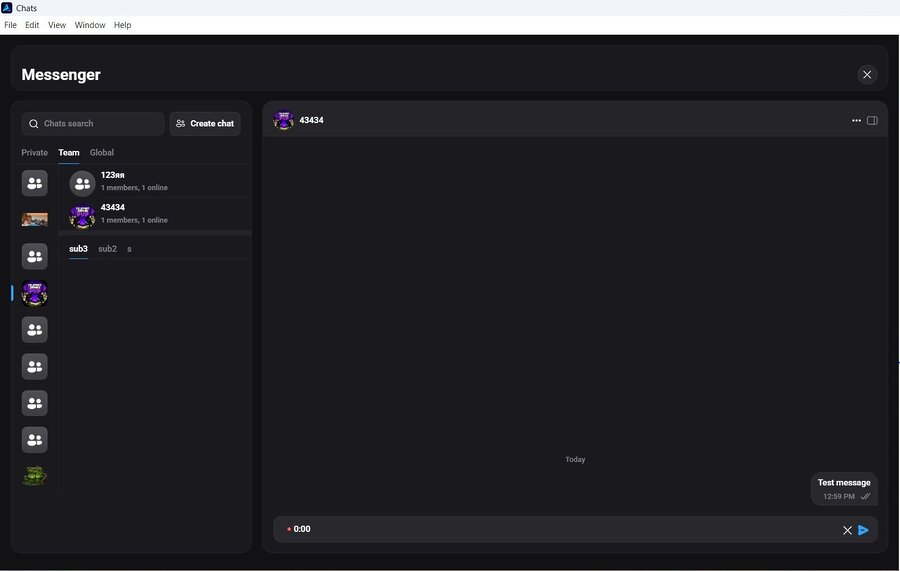
This is where Aurorium is different from a typical anti-detect browser. Most teams end up running an anti-detect browser plus a spreadsheet for tracking, plus a task tool like Asana or Trello, plus Slack or Telegram for communication. Aurorium puts most of that in one place.
- Proxy Manager: supports standard SOCKS5/HTTP proxies with health checks, and can auto-parse a pasted proxy string in whatever format the provider gives it, instead of requiring manual entry into separate fields
- Team Hub: lets a user belong to multiple teams and keep a personal workspace at the same time, without logging out and back in. Owners can create up to 10 teams and belong to up to 20 total, with departments available to separate visibility within a larger team
- Built-in CRM: covers task creation with start dates, deadlines, assignees, and subtasks, plus automatic status tracking and deadline notifications
- Messenger: a full in-client messenger with voice messages, file sharing, and read receipts, split into personal chats, team chats, and a global directory to find and message any other Aurorium user
- Mobile app: extends team and task management to iOS and Android, so a team lead can check in, assign tasks, or reply in chat without a desktop
Syncing actions across multiple profile windows at once
For workflows that involve repeating the same clicks or form entries across several profiles, like opening the same page across many sessions at once, Aurorium includes a tool that tiles profile windows and mirrors input across them, with layout options to keep windows from overlapping.
Customizing the look and feel of the workspace
Beyond a light/dark toggle, Aurorium offers a few visual themes and background options, plus a one-click automatic page translation toggle. That’s a convenient shortcut for working across less common language markets without installing a separate extension.
Security and the independent Cure53 audit
Aurorium has gone through a security audit from Cure53, a Berlin-based firm known for auditing security products like NordVPN, Surfshark, and core Tor infrastructure. For a tool storing cookies, proxy credentials, and sometimes payment or wallet access across many profiles, an independent audit carries more weight than a vendor’s own security claims.
Who Aurorium is built for
- Digital marketing and media buying teams managing accounts across ad platforms
- E-commerce sellers running multiple storefronts or marketplace accounts
- Web3 and crypto users needing account separation across wallets and exchanges
- Freelance and corporate teams managing client accounts at scale
- YouTubers and content creators running multiple channels
- Sales professionals managing outreach across separate identities
- Automation specialists building workflows around browser-based tasks
The CRM, messenger, and mobile app point to Aurorium being built more for teams and agencies than for one person managing a couple of extra accounts.
Aurorium pricing and available plans
Aurorium runs four paid tiers, billed monthly, with discounts of 20% on 6-month billing and 40% on annual billing.
| Plan | Price per month | Profiles included | What’s included | Best for |
| Blink | $10 | 5 | Notifications, messenger, support service | Solo users just starting out |
| Pulse | $99 | 100 | Adds AI Aurorium fingerprints, automation, CRM, team and subdivision creation | Professionals running solo multi-accounting at scale |
| Flare | $149 | 300 | Same feature set as Pulse, with a higher profile cap | Users scaling up existing processes |
| Aurorium | $299 | 1,000 | Adds a personal manager, up to 5 team members, and 2 subdivisions | Larger teams that need reliability at volume |
A few notes worth calling out:
- Only Blink leaves out AI fingerprints, automation, CRM, and team creation. Every plan above it includes all four.
- Extra profiles can be added on top of each plan’s included amount. On Blink, additional profiles run about $1 each, up to 50 extra. Higher plans support scaling up to 10,000 total profiles.
- Teams that need more than the top plan offers (unlimited users, unlimited profiles, personalized pricing, priority support) can request a custom enterprise plan directly from Aurorium.
- Aurorium runs on Windows, macOS, and Linux.
Check the official Aurorium site for the current, most accurate pricing.
FAQ
Aurorium is an anti-detect browser that generates isolated browsing profiles with AI-assisted fingerprints, built around team tools that include a CRM, in-client messenger, and mobile app.
Instead of building fingerprints from fixed presets, Aurorium uses AI to generate hardware profiles where all the parts match up, and avoids repeating fingerprint combinations already used within an account.
Yes. WebRTC and DNS traffic route through Aurorium’s own network stack instead of the local internet connection, and it includes a toggle to block local network scanning.
Media buying and marketing teams, e-commerce sellers, Web3 and crypto users, agencies, content creators, and sales teams managing multiple accounts at once.
Yes, it’s been audited by Cure53, the same firm that has audited NordVPN, Surfshark, and Tor.
Plans start at $10 a month for 5 profiles and go up to $299 a month for 1,000 profiles, a personal manager, and team tools. Annual billing brings the price down by 40%, and larger teams can request a custom enterprise plan.
Conclusion
Aurorium doesn’t read like a repackaged version of an existing anti-detect browser. The fingerprinting approach is more careful than the standard randomize-and-hope model, the network handling closes some common leak paths, and the team tools (CRM, messenger, mobile app) replace a stack of separate apps that most competitors leave you to assemble yourself.
For one person, some of that will be more than needed. For a team managing accounts at scale, it’s a more complete package than most alternatives in this space.