
Helium Browser Review 2026: Will It Work for Fingerprint Masking?
If you’re tired of browsers that feel like they’re working for a data conglomerate instead of you, you’re not alone. We’ve seen a surge in “privacy-first” browsers lately, but most of them come with their own baggage—crypto wallets, sponsored news feeds, or “acceptable ads” programs. Then there’s Helium Browser (helium.computer).
Helium is a chromium browser that strips away the noise and focuses on one thing: letting you browse the internet without interruptions. It’s fast, it’s open-source, and it’s refreshingly honest about what it does. It’s built by a small team under the “imput” organization, known for their zero-telemetry philosophy.
In this review, we’re going to look under the hood of the helium web browser. We’ll talk about its features, its safety, and how it stacks up against the big players. We’ll also clear up some common confusion between this browser and other “Helium” branded tools.
What we’re covering in this deep dive:
- What exactly is Helium Browser and how does it differ from Chrome?
- A detailed breakdown of helium browser features like split view and native !bangs.
- The truth about helium browser safety and its “zero web requests” promise.
- How to get the helium browser download for Windows, Mac, and Linux.
- A direct comparison: fluid browser vs helium.
- A massive FAQ section covering everything from the helium 10 browser extension to helium browser reddit discussions.
What is Helium Browser? The De-Googled Chromium
Let’s get the basics out of the way. Helium Browser is a private, fast, and honest web browser built on the Chromium engine. If you’ve used Chrome or Edge, you’ll feel right at home with the layout, but you’ll notice something immediately: it’s incredibly light.
The developers built Helium with a “people first” philosophy. This means no adware, no bloat, and no tracking. While other browsers try to monetize your attention, Helium just gets out of your way. It’s essentially what Brave should have been before it got cluttered with crypto and rewards programs.
Helium is a minimal, privacy-first Chromium fork. It strips out Google telemetry, ships with uBlock Origin enabled by default, and aims for a “no-noise” experience. It’s fully open source, with all repositories for the core, platform packaging, and ancillary services available for public inspection. This level of transparency is rare and gives users genuine control over their browsing environment.
Key Features and Technical Deep Dive
For a “minimalist” browser, Helium packs some serious punch. It doesn’t just remove things; it adds features that actually make you more productive.
1. Privacy by Default: The Zero-Request Promise
This is Helium’s core selling point. Unlike almost every other browser, Helium makes zero web requests on first launch unless you explicitly act. There are no background network calls, no telemetry being sent to Google, and no “phoning home” to the developers.
- Built-in uBlock Origin: It ships with uBlock Origin pre-installed and enabled. This means community lists block ads, trackers, and crypto miners right out of the box.
- Cookie Blocking: Third-party cookies are blocked by default.
- Chrome Web Store Anonymization: When you install extensions, the traffic is proxied via Helium services. This means Google can’t correlate your extension installs with your IP or profile, a unique privacy feature no other browser offers.
For another in-depth browser review, check out our Mullvad Browser Review 2026
2. Native !Bangs: The Productivity Shortcut
If you’ve used DuckDuckGo, you know about bangs. They are shortcuts that let you search specific sites directly from your address bar. Helium brings this natively to the browser.
- Offline Resolution: The best part? Helium resolves these bangs locally. Your query doesn’t get leaked to a third-party server first.
- Examples: Want to search Wikipedia? Type !w [your query]. Need a quick answer from an AI provider? Use !chatgpt. With over 10,000 bangs available, it’s the fastest and most private way to navigate the web.
3. Split View: The Multitasking Game-Changer

This is a game-changer for multitasking. Helium allows you to open pages side-by-side within a single window.
- Use Case: No more tiling windows manually or switching tabs constantly. It’s perfect for developers who need to see code and documentation at the same time, or for anyone who likes to watch a video while they work.
- Efficiency: Paired with the compact UI, split view maximizes your screen real estate, making you more efficient.
4. Compact and Respectful UI
The helium browser windows and tabs are designed to be as small as possible without losing functionality. This gives you more vertical space for actual web content.
- No Annoyances: The browser is “respectful by design.” It doesn’t annoy you with unprovoked tabs about updates, sponsors, or persistent popups. It just works.
- Clean DevTools: For developers, the DevTools have been cleaned up and no longer nag you with anything, ensuring nothing gets in the way of your work.
5. Extension Support (Including MV2)
One of the biggest wins for Helium is its support for all Chromium extensions. While Google is pushing Manifest V3 (which limits ad-blockers), Helium has committed to supporting MV2 extensions for as long as possible. This keeps full uBlock Origin and many established add-ons viable for the foreseeable future.
The “Helium” Confusion
Before we go further, we need to address the elephant in the room. If you search for “Helium,” you’ll find a few different things.
- Helium Browser (helium.computer): The privacy-focused Chromium browser we’re reviewing here.
- Helium 10 Browser Extension: A popular tool for Amazon sellers. You can use the helium 10 chrome browser extension inside the Helium browser, but they are not made by the same people.
- Helium Floating Browser: An older, legacy project for macOS that allowed for transparent, floating windows. While the new Helium browser is a full-featured tool, it carries the spirit of being lightweight and unobtrusive.
Is Helium Browser Safe? A Security Deep Dive
The short answer: Yes. In fact, it’s probably safer than the browser you’re using right now.
Helium browser safety is built on its “zero web requests” policy and its de-googled Chromium core.
- Security Patches: Because it’s based on helium browser chromium, it receives security patches as soon as they are released. You get the security of the world’s most-tested browser engine without the privacy invasion of Google.
- No Cloud Sync/Password Manager: This is a feature, not a bug. Helium intentionally removes cloud-based history/data sync and the built-in password manager. Their philosophy is that passwords and browsing history should be separate from the browser itself, encouraging users to use dedicated, secure tools like Bitwarden or 1Password.
- IP and WebRTC Protection: Real-world tests confirm that Helium properly isolates WebRTC connections, meaning your real IP address isn’t exposed to sites using peer-to-peer communication—a common privacy leak in many browsers.
First Launch and Configuration
The first time you launch Helium, it stands out with its minimalist design and transparency. During setup, the browser shows a “Helium Services” screen. This is where you decide how the browser connects to the internet.
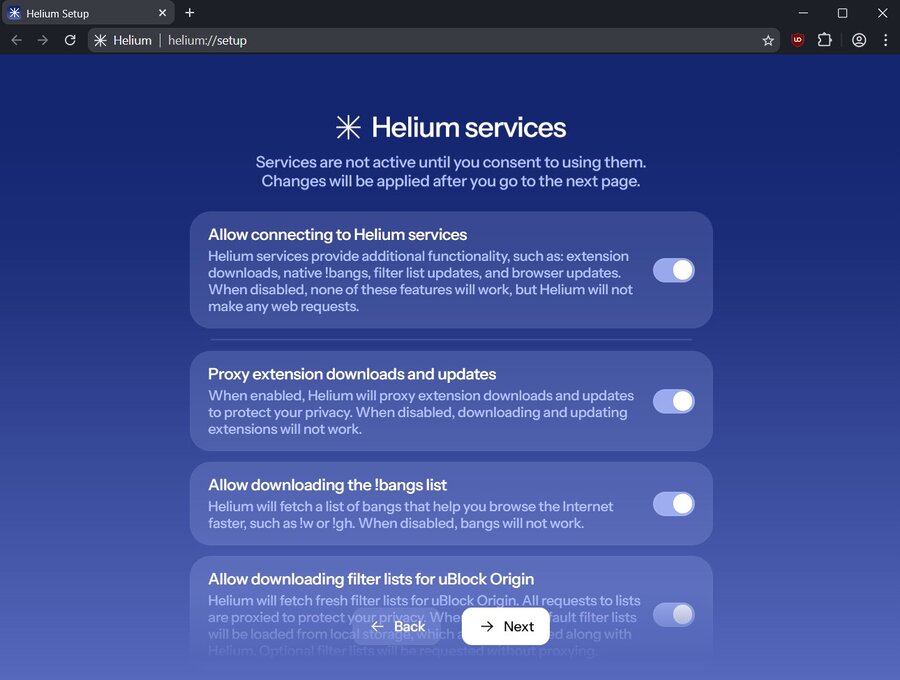
These options control privacy-related features like:
- Extension downloads through a proxy.
- Automatic updates (for macOS).
- uBlock Origin filter refreshes.
- The !bangs quick search list.
You can keep everything enabled for convenience or disable all connections for a completely offline setup. Advanced users can even route these services through their own self-hosted instance, ensuring maximum privacy and independence from third-party servers. This transparency is a huge win for user control.
Helium Browser Download & Compatibility
Getting started is easy. You can find the helium browser download directly at helium.computer.
- Helium Browser Windows: Available as a standard installer for Windows 10 and 11. Note that Windows builds currently require manual updates.
- Helium Browser Mac / MacOS: Fully supported on both Intel and Apple Silicon (M1/M2/M3) chips, with automatic updates.
- Helium Browser Linux: Distributed as an AppImage, making it easy to run on almost any distribution.
Fingerprinting Check Results
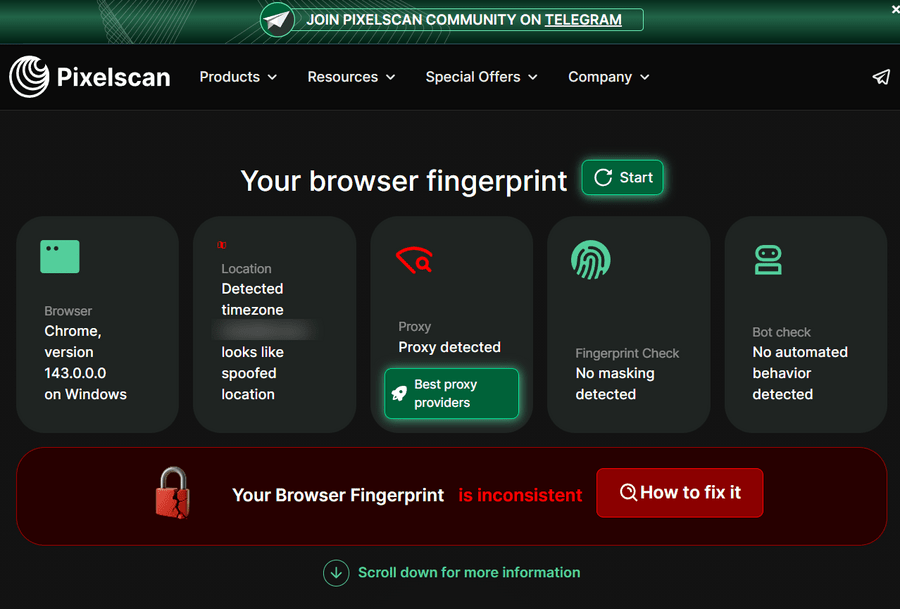
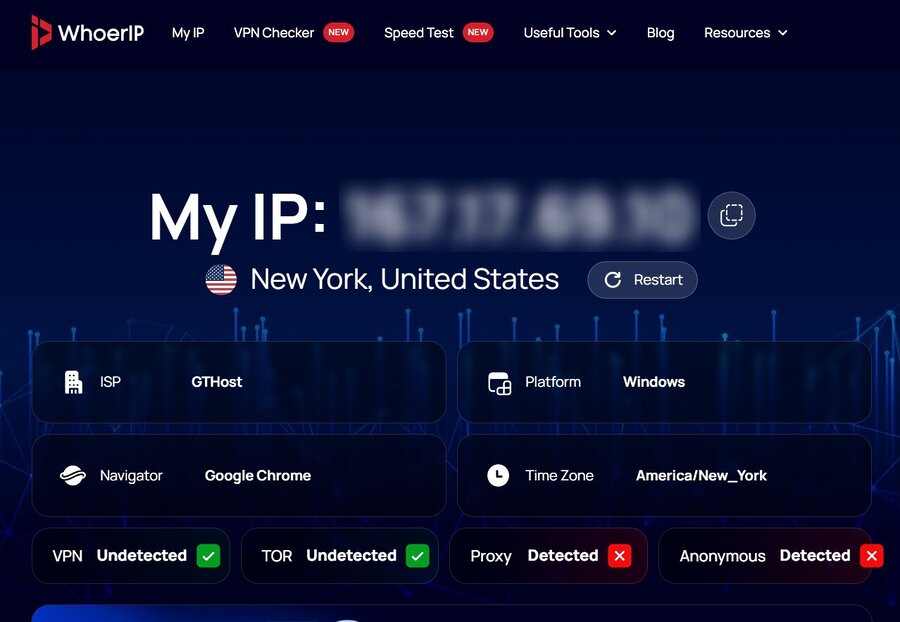
While Helium Browser impresses with speed, minimalism, and privacy-first features, independent tests from Pixelscan and WhoerIP reveal a critical limitation: it still cannot fully mask your fingerprint. Despite its zero-telemetry design and stripped-down Chromium engine, Helium leaves traces that sophisticated anti-detection tools can identify—meaning your browser profile can still be tracked across websites.
Pixelscan Fingerprint Check Results
WhoerIp.com Check Results
If your goal is true anonymity online—especially for managing multiple accounts or automating web tasks—you need a tool built specifically for this. Multilogin is an anti-detect browser designed to mask your fingerprint completely, offering:
- 55+ fingerprint parameters fully customizable for each profile
- Cloud phones for authentic Android environments and stable sessions
- Built-in residential proxies to prevent IP linking
- Scalable multi-account management without risking bans

Pricing
Key Features
In short: Helium is a clean, privacy-minded browser, but it’s not designed for fingerprint masking. For safe automation, multi-account workflows, and full browser isolation, Multilogin remains the industry standard.
User Feedback: What the Community Says
If you check helium browser reddit threads, the sentiment is overwhelmingly positive. Users love the “snappiness” of the interface and the fact that it doesn’t try to sell them anything.
The most common praise is for the helium browser automation potential. Because it’s clean Chromium, it works perfectly with tools like Selenium or Playwright without the overhead of Google’s tracking services. The community appreciates that the browser is built for people who value open-source transparency and control over their browsing environment.
FAQ
How do I get the Helium browser for mac?
You can download the helium browser for mac directly from the official website. It supports helium browser os x and the latest macOS versions. It’s optimized for both Intel and Apple Silicon.
Is there a Helium browser for Windows 10?
Yes, the helium browser for pc works perfectly on Windows 10 and Windows 11. You can find the helium browser for windows installer on the main download page.
Does Helium have a floating browser feature?
While the original legacy Helium was a helium floating browser, the modern helium web browser focuses on being a full-featured daily driver. However, its compact UI and split-view features make it excellent for helium floating browser for multitasking needs.
Can I use the Helium 10 Chrome Extension in this browser?
Absolutely. Since it’s a Chromium-based browser, the kiwi browser helium 10 chrome extension or the standard helium 10 browser extension works perfectly. Just head to the Chrome Web Store and install it.
Is there a Helium browser linux version?
Yes, Helium is available for Linux as an AppImage. It’s a great helium browser alternative for Linux users who want a de-googled experience without the complexity of building from source.
What is the Helium browser window size?
Helium allows for complete flexibility in helium browser window size. You can resize it just like any other window, or use the split-view feature to manage multiple pages in one view.
What happened to Helium reborn browser?
Helium reborn browser was a community attempt to keep the original floating browser alive. The current helium.computer project is a more ambitious, full-scale browser that incorporates those lightweight ideals into a modern engine.
Is there a helium transparent browser option?
The modern Helium browser focuses on a clean, opaque UI for better readability. If you are looking for a helium transparent browser window, you might be thinking of the legacy macOS-only version.
How to use Helium browser for testing?
Helium browser testing is a breeze for developers. Since it’s pure Chromium, you can use it to test web apps in a clean environment without interference from pre-installed extensions or Google services.
Does Helium backup include all settings for Dolphin browser?
There is often confusion here. Helium backup is a separate Android app for backing up app data. It is not related to the Helium web browser. If you are looking to backup Dolphin browser settings, you should use Dolphin’s native sync or the Helium Android app, not this web browser.
What is the helium browser roadmap?
The helium browser roadmap is publicly available on their GitHub. They are currently focusing on refining the UI, improving the split-view experience, and ensuring long-term support for MV2 extensions.
Is there Helium browser for Nokia n9 or n900?
No. While there were browsers named Helium for older mobile OSs like the helium browser nokia n9 or n9, this modern Helium browser is designed for desktop operating systems (Windows, Mac, Linux).
Conclusion
Helium Browser delivers a clean, privacy-focused Chromium experience. Its lightweight design, split-view multitasking, and zero-telemetry approach make it ideal for users who value speed and simplicity without ads or clutter.
However, when it comes to masking your digital fingerprint, Helium falls short. Tests from Pixelscan and WhoerIP confirm that advanced tracking can still identify your browser profile. If you need true anonymity, safe automation, or reliable multi-account management, a specialized anti-detect browser like Multilogin is the better choice. With 55+ customizable fingerprint parameters, cloud phones, and built-in proxies, Multilogin ensures your online activity remains private and secure at scale.
In short: Helium is excellent for clean, everyday browsing—but for fingerprint protection and advanced online workflows, you’ll need a tool designed for the task.