How to Recharge TikTok Coins in 2026
Let’s be direct: if you’re on TikTok, you’ve probably thought about buying coins. Maybe you want to support a creator, send gifts, or just engage more. But here’s the kicker: not all coin purchases are created equal. Some ways cost you more, sometimes a lot more.
This guide cuts through the noise to show you the honest truth about recharging TikTok coins in 2026, focusing on how to save your cash and avoid common traps.
What Are TikTok Coins?
Before we dive into how to get them, let’s clarify what TikTok coins actually are.
They’re TikTok’s virtual currency. You buy them with real money, and then you use them within the app to purchase virtual gifts. These gifts are what you send to creators during their live streams or on their videos. When a creator receives a gift, it converts into real money. So, in essence, coins are how you directly support your favorite TikTok personalities and help them monetize their content.
TikTok coins are tokens used for interaction and appreciation within the TikTok ecosystem.
How to Recharge TikTok Coins: Official Methods on the App and Web
First, let’s talk about the two main ways TikTok officially lets you buy coins. You’ve got options, but one is clearly better for your wallet.
1. The Mobile App: Convenience at a Cost
Buying coins directly through the TikTok application on your iPhone or Android is easy. You navigate to your profile, hit “Settings and Privacy,” then “Balance,” and finally “Recharge.” It’s straightforward, but that simplicity comes with a price tag. Apple and Google take a hefty 30% cut from in-app purchases. TikTok passes that cost directly to you. So, if you’re buying 700 coins for $9.99 on your phone, understand that a chunk of that goes straight to the app store, not just TikTok.
Pros:
- Convenience: Quick and easy, right from your phone.
- Instant: Coins are usually available immediately.
Cons:
- Most Expensive: You pay a premium due to app store fees.
- Less Value: You get fewer coins for your dollar.
2. The Desktop Website: Your Best Bet for Savings
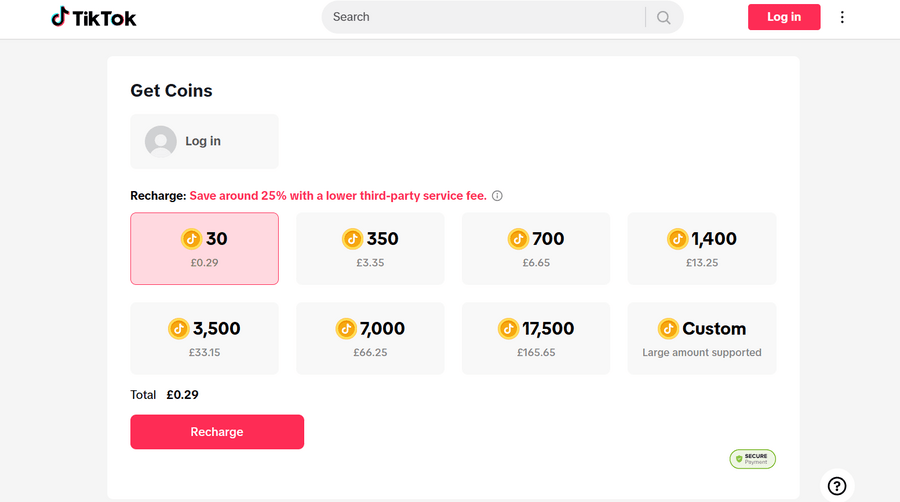
Want to save money? Use the official TikTok website: tiktok.com/coin. This isn’t a secret trick; it’s just how it works. When you buy coins through the website, TikTok avoids those app store commissions. That saving gets passed to you. We’re talking about a significant difference, around 25-30% cheaper. For those same 700 coins, you might pay closer to $7.49 on the desktop site. It’s a straightforward choice: pay more for mobile convenience or save real money by using a browser. The numbers don’t lie.
Pros:
- Cheaper Prices: Significant savings compared to in-app purchases.
- Direct Purchase: You’re buying directly from TikTok.
Cons:
- Less Convenient: Requires a computer or web browser, not as seamless as in-app.
Advanced Tactics: Playing the System (Carefully)
Beyond the official channels, some users dig deeper to find even cheaper coins. These methods can work, but they come with their own set of risks. Be smart about it.
1. VPNs and Regional Pricing
TikTok coin prices aren’t the same everywhere. Some countries get better deals. In 2026, places like Brazil, Argentina, and even the USA (compared to some European markets) often have lower prices. Japan is another one that pops up. The idea is simple: use a Virtual Private Network (VPN) to make it look like you’re buying from one of these cheaper regions. You connect your VPN to a server in, say, Brazil, then head to the TikTok coin recharge page. You might see significantly lower prices. For example, you might see significantly lower prices in some regions. That’s a solid saving.
However, this isn’t a free pass. TikTok’s systems are getting smarter. Constantly jumping between IPs or making purchases from wildly different locations can flag your account. This kind of suspicious activity could lead to a tiktok shadowban, where your content stops showing up on the ‘For You’ page. Your videos won’t get views, and your engagement tanks. It’s a real problem for creators and businesses. So, if you go this route, be consistent and don’t overdo it.
Pros:
- Potentially cheapest: Access to the lowest prices globally.
Cons:
- Risk of shadowban: TikTok can flag suspicious activity.
- VPN required: Adds an extra step and potential cost.
- Terms of service: May violate TikTok’s terms.
2. Third-Party Marketplaces: High Risk, Potential Reward
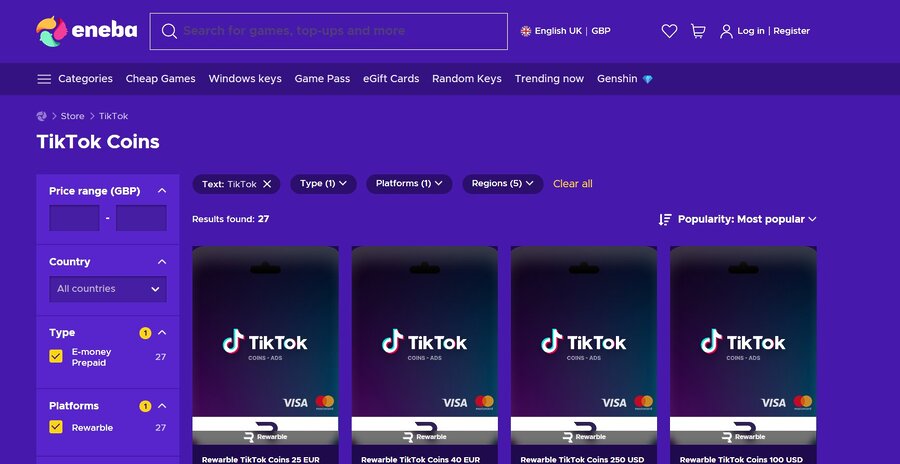
Sites like Eldorado.gg or Eneba sometimes offer TikTok coins or gift cards at a discount. The appeal is obvious: cheaper coins without the VPN hassle. But here’s the honest truth: this is where things get risky. Many of these sites are not official. If they ask for your TikTok login details, run. Giving your credentials to a third party is a direct path to account compromise. You could lose access to your account, or worse, have it used for spam or scams.
Beyond direct security threats, using unauthorized third-party services can also trigger TikTok’s fraud detection. This is another fast track to a tiktok shadowban or even a permanent ban. TikTok wants you to buy coins through their channels. When you try to bypass that, they notice. It’s not worth risking your account for a few dollars saved.
Pros:
- Possible discounts: Can sometimes find coins cheaper than official channels.
- No VPN needed: Simpler than the VPN method.
Cons:
- High security risk: Potential for account compromise or theft.
- Risk of Ban/Shadowban: TikTok actively discourages and punishes unofficial purchases.
- Scam potential: Many sites are fraudulent.
What This Means for Your TikTok Strategy
Understanding coin recharge protects your account and saves money. Here’s what matters for different users.
If You Buy TikTok Accounts
Newly bought TikTok accounts need careful handling, especially with coins. Here’s what to watch:
- Don’t buy large amounts of coins immediately after getting the account
- Avoid suspicious recharge sources or constant VPN changes
- TikTok flags unusual financial activity on new accounts
- Treat purchased accounts the same as your main one for transactions
One mistake can get the account banned or shadowbanned, wasting your investment.
If You Run Multiple Accounts
Managing coins across multiple TikTok accounts requires consistency:
- Buying through mobile apps on each account wastes money
- Use the desktop website for all purchases to get better prices
- Centralized purchases create a uniform pattern
- Random purchase patterns across accounts can look like bot activity
This approach saves money and keeps your accounts looking legitimate to TikTok’s algorithms.
FAQ
How to recharge TikTok coins?
You can recharge TikTok coins using two official methods: inside the TikTok mobile app or through the official TikTok coin recharge website.
In the app, coins are purchased via in-app payments on iOS or Android. On the web, you can visit TikTok’s official coin recharge page and buy coins using a browser. The process is simple in both cases, but prices differ due to app store fees.
How to recharge coins on TikTok using the website?
To recharge coins on TikTok through the website, log in to your TikTok account in a desktop or mobile browser and go to the official TikTok coin recharge page. Select the coin package you want, choose a payment method, and complete the purchase. Coins are usually added to your account instantly. This method is often cheaper than buying coins inside the app.
What is the official TikTok coin recharge website?
The official TikTok coin recharge website is TikTok’s own web-based payment page, accessible through a browser. It allows users to purchase coins directly from TikTok without going through Apple App Store or Google Play billing. This is currently the safest and most cost-effective way to recharge TikTok coins.
How to recharge TikTok coins for free?
There is no official way to recharge TikTok coins for free. TikTok coins must be purchased with real money.
Some users earn gifts during live streams, which convert into diamonds for creators, but regular users cannot generate free coins. Any website or app claiming to offer free TikTok coin recharge is likely misleading or unsafe.
Why can’t I recharge coins on TikTok?
If you can’t recharge coins on TikTok, common reasons include:
- Payment method issues or declined transactions
- Temporary regional or billing restrictions
- Account limitations, such as new or flagged accounts
- App version issues or cached errors
Trying the desktop website instead of the mobile app often resolves payment problems.
How to recharge cheap TikTok coins?
The cheapest way to recharge TikTok coins is by using the official TikTok website instead of the mobile app. Web purchases avoid app store fees, which usually makes coins around 25–30% cheaper.
Some users attempt to reduce prices further using regional pricing, but this can increase the risk of account flags or shadowbans if done incorrectly.
Are VPNs safe for TikTok coin recharge?
Using a VPN to access TikTok and buy cheaper regional coin prices can work, but it carries risks. Frequent IP changes or mismatched locations during payments may trigger TikTok’s fraud or security systems. This can result in restricted features, failed payments, or reduced content visibility. Consistency and moderation are critical if users attempt this method.
Is it safe to use third-party TikTok coin recharge websites?
Most third-party TikTok coin recharge websites are not officially supported by TikTok. Many carry risks such as account compromise, payment fraud, or policy violations. If a site asks for your TikTok login credentials, it should be avoided. Using unofficial sources can also lead to account limitations or permanent bans.
Do TikTok coin prices change by country?
Yes, TikTok coin prices vary by region. Currency value, local taxes, and platform pricing strategies affect how much coins cost in different countries. This is why some regions appear cheaper than others, especially when comparing prices between the app and the website.
Can buying coins cause a TikTok shadowban?
Buying coins through official channels does not cause a shadowban. Issues usually arise from unusual behavior, such as frequent VPN location changes, third-party purchases, or large transactions on new or inactive accounts. Keeping recharge activity consistent and using official methods minimizes risk.
Should I recharge coins on new or bought TikTok accounts?
New or purchased TikTok accounts should recharge coins cautiously. Large or sudden purchases can look suspicious to TikTok’s systems. It’s safer to start with small transactions and use official recharge methods to avoid triggering fraud or security checks.
Conclusion
Recharging TikTok coins isn’t complicated, but doing it smartly requires a bit of thought. The desktop website is your go-to for consistent savings. If you’re considering VPNs, understand the risks and use them sparingly and consistently. Third-party marketplaces are generally a bad idea—the security risks and potential for a tiktok shadowban or ban usually outweigh any perceived savings. Whether you’re a casual user, managing multiple TikTok accounts, or even if you buy TikTok accounts, prioritize official, secure methods. It keeps your account safe and your wallet happier. Don’t overcomplicate it; just be direct and smart about your choices.