Twitter GIF Downloader Guide: How to Save GIFs from Twitter (X)
Have you ever seen a perfect reaction GIF on Twitter (now X) and tried to save it? You right-click or tap and hold, and… nothing happens. You get only a static image or a broken link. It is frustrating. You just want to save the GIF to your collection.
This happens because Twitter does not use true GIF files. Every animated image you see is actually a video file. It is an MP4 video that loops forever. Twitter does this to make the platform faster. MP4 files are much smaller and load quicker than old-school GIFs.
This guide will show you how to beat this technical trick. We will explore the best tools and platforms. You will learn how to use a dedicated Twitter GIF downloader to grab any animated clip you want. We will cover web tools, mobile apps, and browser extensions. By the end, you will be able to download GIF you liked from Twitter easily, no matter what device you use.
The Core Problem: Twitter GIFs Aren’t Really GIFs
To understand how to download GIFs, you must know what they are. When you upload a GIF to Twitter, the platform changes it. It converts the GIF into a video file. This video is called a VIF (Video Interchange Format) or simply a looping MP4.
This conversion is smart for Twitter. It saves a lot of bandwidth. It makes your timeline load faster. But now it’s our problem: your browser sees a video, not a simple image file. This is why the standard “Save Image As” option fails. It only saves a single frame of the video. You lose the animation.
Technically, Twitter GIFs belong to the same category as other short-form video formats, which is why users often rely on tools like a YouTube Shorts downloader to save optimized video content that platforms don’t offer for direct download.
Why You Need a Twitter GIF Downloader
To get the animated file, you need a special tool. Without a dedicated Twitter GIF Downloader, you are stuck. You cannot simply copy and paste the animation. You need a reliable method to capture the media.
This approach is not unique to Twitter — platforms like Instagram apply similar restrictions, which is why guides on downloading Instagram Reels are often needed to access media outside the app.
Twitter does not offer a native download button for GIFs. They want you to stay on their platform. But what if you want to use that perfect reaction in a text message? What if you are a content creator and need that GIF?
A dedicated Twitter GIF downloader is essential for several reasons:
- It bypasses the MP4 conversion. The tool knows how to find the direct link to the high-quality video file.
- It saves time. Instead of complicated workarounds, you paste a link and click one button.
- It ensures quality. You get the best possible resolution of the animated clip.
- It works on all devices.
A proper tool is fast, clean, and gives you the file you need instantly.
Top Tools for Every Device for downloading GIF from Twitter
The best tool for you depends on where you do most of your browsing. We have broken down the top options for web, mobile, and desktop users.
1. Browser Extensions (Desktop Power Users)
If you spend all day on your computer and need to save Twitter GIF files often, an extension is your fastest option. It adds a small button right next to the GIF on your screen.
Twitter Gif & Video Downloader

Many extensions exist, but the best ones are simple. They add a small download icon to every video or GIF on your timeline.
How it works:
- Install the Twitter GIF downloader extension from the Chrome or Firefox store.
- Browse Twitter as normal.
- When you see a GIF, a small “Download” button appears below it.
- Click the button. The download starts immediately.
This method is the fastest for frequent users. It removes the need to copy and paste links. It is the most efficient way to download Twitter GIF content on a desktop.
2. Web-Based Downloaders (Desktop and Mobile)
These tools are the easiest to use. They work right in your browser. You do not need to install anything.
TWDownload
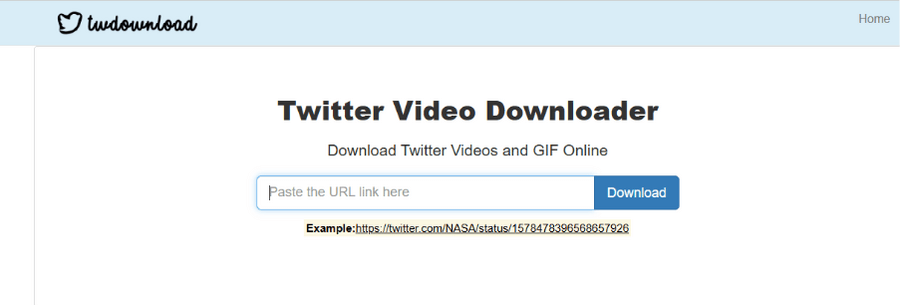
TWDownload is one of the best choices for speed and simplicity. It is a clean website for downloading GIF from Twitter.
How to use it:
- Go to the TWDownload website.
- Paste the link to tweet with the GIF you want into the box.
- Click the “Download” button.
- The site will show you different quality options. Choose the best one.
- The file you get is an MP4. You can use this video file as a GIF in most modern apps.
EZGIF (The Converter)
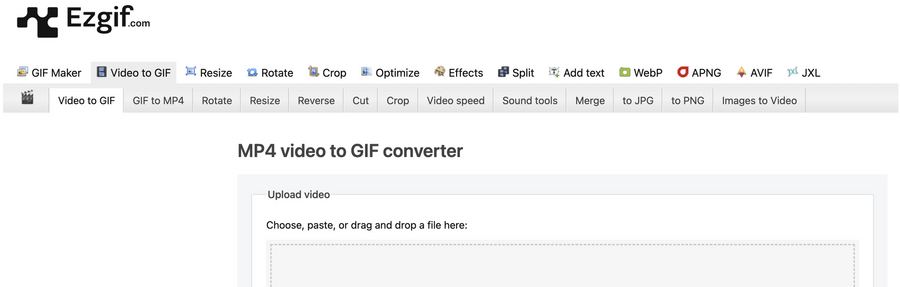
Sometimes, you really need a true GIF file. Maybe an older app only accepts the GIF format. This is where EZGIF comes in. It is not a direct Twitter gif downloader, but it is the best tool for conversion.
How to use:
- Paste the link on GIF you want into the box.
- Go to the website and find the “Video to GIF” tool.
- Upload the MP4 file you downloaded.
- Click “Convert to GIF.”
- You can also use site to crop, resize, or edit GIFs before saving it.
3. IOS and Android apps
Apple and Google have strict rules about saving media. These apps are designed to work around those rules.
GIFwrapped (iOS)

For IOS users, GIFwrapped is the gold standard. It is a dedicated GIF library app. It makes downloading GIF from Twitter a smooth process on Apple devices.
Features:
- Simplicity: You paste the link. The app will make the rest.
- Library: Your GIFs are in one place. You can find, manage and share them later in easy way.
- Cloud Synchronization
Video Downloader for Twitter (Android)
Features:
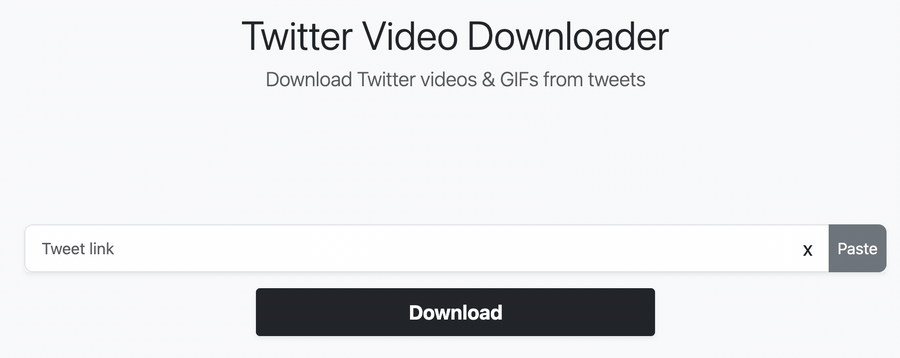
•Use native «Share»: You can use the native Android “Share” function. Then, you select the Downloader app from the list. This is the fastest way to start a download.
• Best quality: The app uses the highest resolution MP4 file available.
• Media Management: The app often includes a gallery to manage your videos and GIFs. You can easily find and share your saved content.
4. Advanced Downloading and Batch Processing
For most people, the tools above are enough. But what if you need to download a huge amount of GIFs? What if you need to collect data at scale? This is where advanced methods come in.
The Power of Scripts
Users can use simple Python scripts to automate the process. These scripts use the Twitter API or special libraries to find the video link. Then they can download the file directly. This is much faster than clicking one by one.
When running scripted or repeated downloads, maintaining a consistent browser environment becomes important. Tools like Multilogin are often used in automation workflows to keep browser sessions isolated and stable, especially when working with multiple scripts, accounts, or parallel tasks.
Why use a script?
- Batch Processing: You can download GIFs from 100 links. It will download all of them automatically.
- Custom Quality: You can choose quality and format,
- No Ads.
To use this method, you need some technical knowledge. But it is the most powerful way to handle large-scale downloading GIF from twitter tasks.
For larger-scale media downloading or account-based workflows, many users turn to some other solutions reviewed in Pixelscan’s guide to best antidetect browsers — since a reliable browser environment can help ensure consistent output and reduce risks when automating downloads.
But even for personal use, interacting with third-party download tools can expose browser-level signals, which is why running a quick check with PixelScan can help identify potential fingerprinting risks.
FAQ
How to download a GIF from Twitter?
The easiest way is to use a Twitter GIF downloader tools like TWDownload. You copy the link, paste it and click «download».
Why can't I just right-click and save Twitter GIF?
Twitter converts all GIFs into looping MP4 video files for faster performance. When you right-click, your browser only sees a video player. It cannot save the animated file directly. You need a special GIF downloader Twitter to extract the underlying video file.
Are there any good options for a Twitter GIF downloader extension?
Yes, there are many excellent browser extensions for Chrome and Firefox. These extensions add a direct download button to the tweet itself. This makes downloading GIF from Twitter a one-click process. Search your browser’s extension store for “Twitter Video Downloader” or “GIF Downloader.”
Is downloading GIF from Twitter legal?
Generally, downloading media for personal use is fine. However, you should never re-upload or use someone else’s content for commercial purposes without permission. Always respect copyright and the original creator’s rights.
What is the best way to save Twitter GIF on an iPhone?
The best way to save Twitter GIF on an iPhone is by using a dedicated app like GIFwrapped. It is designed to work seamlessly with IOS. It lets you paste the tweet link and saves the animated file directly to your phone’s GIF library.
Do I need to convert the file after I download twitter gif?
Not usually. Most modern social media apps and messaging services can play the MP4 file you get from the twitter gif downloader. The MP4 file is higher quality and smaller. Only convert it to a true GIF using a tool like EZGIF if you are using an older platform that requires the GIF format.
Conclusion
Downloading GIFs from Twitter can be confusing at first. Because Twitter uses MP4 videos instead of traditional GIF files, standard save options often don’t work. With a proper Twitter GIF downloader, however, saving animated content becomes simple and reliable.
The right tool depends on how often you need to download GIFs. Web tools like TWDownload are suitable for occasional use, while mobile apps such as GIFwrapped are more practical on phones. If you download GIFs frequently, a browser extension is usually the fastest option.
For users working at scale—such as managing multiple accounts or running automated workflows—it’s also important to separate sessions and reduce account-linking risks. Solutions like Multilogin help create isolated browser environments, making large-volume media downloads more stable and safer across multiple accounts.