Bulk IP Address Lookup: What Your IPs Are Really Telling the Internet (And Who’s Listening)
You Think Your IPs Are Just Addresses. They’re Actually Your Digital Fingerprints.
Here’s something most people don’t realize:
Every IP address you use carries a history. A reputation. A risk score.
And when websites, ad networks, or anti-fraud systems see your IP — they already know if it’s been flagged, what country it claims to be from, whether it’s a proxy, a VPN, a datacenter, or a “real” residential connection.
If you’re managing multiple accounts, running automation, or simply trying to stay private — your IPs might be quietly getting you flagged, banned, or tracked without you ever knowing.
Test Yourself First (Do This Before Reading Further)
Before we go deeper, take 30 seconds to run a quick self-check.
Go to Pixelscan and see exactly what your current IP is revealing: your geolocation, ISP, risk score, proxy detection status, and whether sites would trust or flag your connection.
Do it now. The results might surprise you.
What Is a Bulk IP Address Lookup?
A bulk IP address lookup is exactly what it sounds like: instead of checking one IP address at a time, you submit a list – 10, 100, 1,000+ IPs – and get back data on all of them at once.
For each IP, a lookup typically returns:
- Geolocation: country, city, region, sometimes zip code
- ISP / Organization: who owns the IP range
- IP Type: residential, datacenter, VPN, proxy, Tor exit node
- Risk Score: how “suspicious” the IP looks to fraud detection systems
- Blacklist Status: whether it appears on known spam or abuse lists
- ASN (Autonomous System Number): the network it belongs to
One IP is easy to check manually. When you’re dealing with dozens or hundreds, you need bulk.
Who Actually Uses Bulk IP Lookup (And Why)
Multi-Account Managers
If you run multiple accounts on any platform — e-commerce, social media, affiliate networks — each account ideally needs a unique, clean IP. Bulk lookup lets you audit your entire proxy pool at once and spot which IPs are already flagged or shared.
Automation Specialists
Bots, scrapers, and automation scripts cycle through IPs fast. A single bad IP can tank an entire campaign. Bulk lookup helps you pre-screen IPs before deploying them.
Privacy-Conscious Users
You’ve got 20 proxies from different providers. Which ones actually look like real residential IPs? Which ones are screaming “datacenter!” to every website you visit? Bulk lookup tells you before the websites do.
Mobile Account Managers
Managing multiple mobile accounts across different SIMs or mobile proxies? Each IP needs to look legitimate and geographically consistent. One mismatch can trigger a review or ban.
Reality vs. Myth: What People Get Wrong About IPs
❌ Myth: “If I use a VPN, my IP is clean and untraceable.”
✅ Reality: Most VPN IPs are heavily flagged. They sit in datacenter ranges that every anti-fraud system knows. Websites see “VPN” stamped all over your connection.
❌ Myth: “Proxy IPs from paid providers are always safe.”
✅ Reality: Many proxy IPs are shared across thousands of users. If even one person used that IP for spam, fraud, or scraping — the IP carries that reputation. And you inherit it.
❌ Myth: “Residential IPs are always trusted.”
✅ Reality: Residential IPs can still be flagged if they’ve been misused, if the geolocation doesn’t match your browser’s timezone or language, or if the usage pattern looks automated.
❌ Myth: “IP reputation doesn’t matter if I’m just browsing.”
✅ Reality: Ad networks, login pages, checkout systems, and CAPTCHA triggers all check your IP reputation in milliseconds — before you even see the page load.
What Data Does a Bulk IP Lookup Actually Return?
Let’s break down the fields you’ll encounter and what they actually mean:
1. Geolocation
Where the IP is physically registered. Note: this is the registered location, not necessarily where the server physically sits. A US proxy might show a city — but the accuracy drops fast below country level.
2. ISP / Organization Name
This is huge. An IP registered to “Amazon Web Services” or “DigitalOcean” instantly signals: datacenter. An IP registered to “Comcast” or “Vodafone” signals: residential consumer. Platforms notice.
3. IP Type Classification
- Residential — assigned to home internet users. High trust.
- Mobile — assigned to mobile carriers. Very high trust, hard to fake.
- Datacenter — server farms. Low trust, heavily filtered.
- VPN / Proxy — flagged by most anti-fraud systems immediately.
- Tor — near-universal block on sensitive platforms.
4. Risk Score
A composite score — typically 0–100 — built from blacklist appearances, abuse reports, usage patterns, and IP type. A score above 70 is typically “block or challenge” territory on serious platforms.
5. Blacklist Status
Checks the IP against known DNS-based blacklists (DNSBLs), spam databases, and fraud registries. One appearance can drop trust significantly.
Mini Experiment: The Proxy Audit Test
Here’s a simple test you can run right now if you have a list of proxies:
Step 1: Export your proxy IP list (just the IP addresses, no ports/credentials needed for this).
Step 2: Run them through a bulk IP lookup tool.
Step 3: For each IP, note:
- Is it datacenter or residential?
- What’s the risk score?
- Does the geolocation match where you told your accounts you’re based?
Step 4: Flag any IP with:
- Risk score above 50
- Type listed as “datacenter” when you need residential
- Geolocation mismatch vs. your account’s supposed location
Step 5: Replace flagged IPs before your next session.
Most people skip this step. Then wonder why their accounts get flagged.
Why IP Lookup Alone Isn’t Enough
Here’s the uncomfortable truth:
Even if all your IPs look clean on paper — you can still get flagged.
Why? Because IP is only one signal out of dozens that modern tracking systems monitor.
Platforms also check:
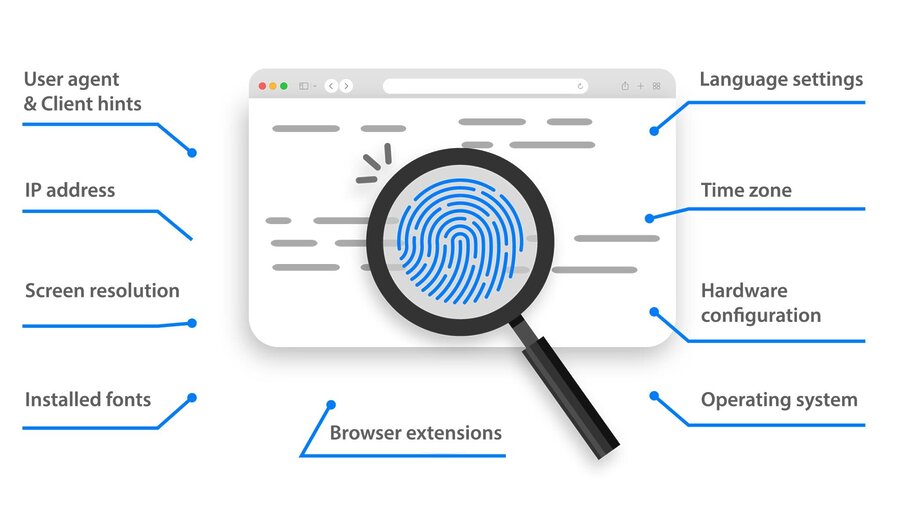
- Browser fingerprint — your screen resolution, fonts, timezone, WebGL renderer
- Behavioral patterns — how fast you click, scroll, and type
- Canvas and audio fingerprints — unique identifiers generated by your hardware
- Cookie and storage leaks — data that persists across “separate” sessions
- WebRTC leaks — your real IP leaking through the browser even with a proxy
You can have a perfect residential IP and still get caught because your browser fingerprint screams “automation tool” or your timezone doesn’t match your IP’s country.
Want to see exactly what your browser is leaking beyond your IP? Run a full fingerprint check on Pixelscan – it shows everything platforms can see about you, not just your IP.
The Stack That Actually Works for Multi-Account Safety

If you’re serious about multi-account management or automation, IP lookup is the starting point — not the finish line.
Here’s the layered approach professionals use:
Layer 1: Clean IPs Use residential or mobile proxies from reputable providers. Nodemaven.net offers residential and mobile proxies with real geolocation diversity: the kind that passes IP reputation checks cleanly.
Layer 2: Isolated Browser Environments Each account needs its own browser profile with a unique, consistent fingerprint. Multilogin creates isolated browser environments where each profile has its own fingerprint, cookies, and storage – completely separate from every other profile.
Layer 3: Fingerprint Verification Before going live, test each profile + proxy combination to confirm consistency. Pixelscan checks whether your IP geolocation, browser timezone, language, and fingerprint all align – or whether they’re contradicting each other (which is exactly what detection systems look for).
How to Do a Bulk IP Lookup: Your Options
Option 1: IP Reputation APIs
Services like IPinfo, IPQualityScore, and AbuseIPDB offer APIs where you can submit batches of IPs programmatically. Best for developers or large-scale operations.
Option 2: Bulk Lookup Tools (No-Code)
Several web tools let you paste a list of IPs and download results as CSV. Look for tools that return: geolocation, ISP, IP type, risk score, and blacklist status in one export.
Option 3: Manual + Spot-Check
For smaller proxy pools (under 50 IPs), manual checking through individual lookup tools is fine — just slow. Use Pixelscan for the full picture including browser-level signals.
What to Do With Your Results
Once you have your bulk lookup data, here’s the action framework:
✅ Keep: Residential or mobile IPs, risk score under 30, geolocation matches your use case, not on any blacklist.
⚠️ Use with caution: Risk score 30–60, datacenter IPs on lower-sensitivity platforms, IPs with minor geolocation inconsistencies.
❌ Replace immediately: Risk score above 60, VPN/proxy flagged IPs for account work, any IP on a major blacklist, datacenter IPs on platforms with strict fraud detection.
Key Takeaways
- Bulk IP lookup saves massive time when auditing proxy pools or IP lists
- Every IP carries a reputation – and you inherit it the moment you use it
- Clean IPs matter, but they’re only one piece of the puzzle
- Browser fingerprinting, timezone mismatches, and behavioral signals can expose you even with perfect IPs
- The winning stack: clean residential/mobile IPs + isolated browser profiles + regular verification
- Test your current setup – don’t assume it’s clean because you paid for it
FAQ
A bulk IP address lookup lets you check multiple IP addresses simultaneously — retrieving geolocation, ISP, IP type (residential, datacenter, VPN), risk score, and blacklist status for each IP in a single batch query instead of checking one at a time.
You can use IP reputation APIs (like IPinfo or IPQualityScore) that accept batch requests, or web-based bulk lookup tools where you paste a list of IPs and receive a downloadable CSV with data for each address.
Yes — this is one of the most common uses. Run your proxy IP list through a bulk lookup to check IP type (residential vs. datacenter), risk scores, geolocation accuracy, and blacklist status before using them for account management or automation.
IP reputation is only one signal. Platforms also check your browser fingerprint, timezone, language settings, WebGL data, and behavioral patterns. A clean IP paired with a mismatched browser fingerprint is still detectable. Tools like Pixelscan reveal what’s leaking beyond your IP.
A datacenter IP is registered to a server farm (AWS, DigitalOcean, etc.) and is immediately recognizable as non-human traffic by most platforms. A residential IP is assigned to a home internet user by an ISP and carries much higher trust scores.
It lets you audit your entire proxy pool at once — identifying flagged, blacklisted, or misclassified IPs before they get your accounts banned. Each account should ideally use a unique, clean residential or mobile IP that matches its supposed location.
Replace any IPs with a risk score above 60, datacenter classification (if you need residential), geolocation mismatches, or blacklist appearances. Then verify your full browser + IP setup using a fingerprint checker to make sure all signals are consistent.
Key Takeaways
- Bulk IP lookup saves massive time when auditing proxy pools or IP lists
- Every IP carries a reputation — and you inherit it the moment you use it
- Clean IPs matter, but they’re only one piece of the puzzle
- Browser fingerprinting, timezone mismatches, and behavioral signals can expose you even with perfect IPs
- The winning stack: clean residential/mobile IPs + isolated browser profiles + regular verification
- Test your current setup — don’t assume it’s clean because you paid for it